It is now possible for #linux users to download a #flatpak to test #pumoku.
-
@simonjust Still alpha, but it is playable, and imo works relatively well. The game is still qml, I will move engine to c++ next I think, hoping that it will be faster - esp. the pencilmark generator.
I hope to get it ready for a kde-apps release in spring 2026 ...@anderslund Looking forward to try it

-
It is now possible for #linux users to download a #flatpak to test #pumoku. Get it from https://invent.kde.org/alund/pumoku/-/jobs/3622425/artifacts/download
What you get is a zip file, so unzip it, open the pumoku.flatpak with whateveryouuseforthat (like kde discover) and install it.
Let me know how it went, and if you like pumoku, which today got a nice tablet mode that is also quite usefull on deskop. Just bear in mind that pumoku meant for mobile, so no keyboard support at least at this time

This is a amd64 package, so not suitable for most #linux_on_mobile users - yet. The kde/qt runtime flatpak will be downloaded as well, if not present.
@anderslund @kde did you write that? In what language...? #curious
-
@anderslund @kde did you write that? In what language...? #curious
@hanscees @kde Hello, pumoku is written mainly in qml, using the KDE Kirigami framwork. Even the game ufnctionality is currently qml (which is a declarative mix of templates and javascreipt by Qt). The qqwing library which is generating the puzzles ,- not by me - is written in c++. I plan to convert the game handling in c++, for a bit of speed in the heaviest parts.
The source is available, shorten the download link a bit
-
@hanscees @kde Hello, pumoku is written mainly in qml, using the KDE Kirigami framwork. Even the game ufnctionality is currently qml (which is a declarative mix of templates and javascreipt by Qt). The qqwing library which is generating the puzzles ,- not by me - is written in c++. I plan to convert the game handling in c++, for a bit of speed in the heaviest parts.
The source is available, shorten the download link a bit
@anderslund @kde cool, thanks.
I am not a developer, but building a conways game of life app with #beeware. It is supposed to work on both #linux, #android and #windows (dependant on the underlying parts you use). Mainly python development this beeware, but actually close to my limits.
@beeware
https://codeberg.org/hanscees/WolfDeerWorld-Beewarethe code of the app is this https://codeberg.org/hanscees/WolfDeerWorld-Beeware/src/branch/main/code/wolfeatdeer/src/wolfeatdeer/app.py
-
@anderslund @kde cool, thanks.
I am not a developer, but building a conways game of life app with #beeware. It is supposed to work on both #linux, #android and #windows (dependant on the underlying parts you use). Mainly python development this beeware, but actually close to my limits.
@beeware
https://codeberg.org/hanscees/WolfDeerWorld-Beewarethe code of the app is this https://codeberg.org/hanscees/WolfDeerWorld-Beeware/src/branch/main/code/wolfeatdeer/src/wolfeatdeer/app.py
-
@anderslund @kde ah, so you can deploy to android as well, thats cool, didn't know that.
#kde -
@anderslund @kde ah, so you can deploy to android as well, thats cool, didn't know that.
#kde@hanscees @kde You can get some of the mobile oriented kde apps on f-droid, like neochat, tokodon for example. Look here: https://community.kde.org/Android/F-Droid
-
@hanscees @kde You can get some of the mobile oriented kde apps on f-droid, like neochat, tokodon for example. Look here: https://community.kde.org/Android/F-Droid
@anderslund @kde 24 packages is not yet a plethora, but a good begin right?
gonna try kdeconnect. -
@anderslund @kde 24 packages is not yet a plethora, but a good begin right?
gonna try kdeconnect. -
It is now possible for #linux users to download a #flatpak to test #pumoku. Get it from https://invent.kde.org/alund/pumoku/-/jobs/3622425/artifacts/download
What you get is a zip file, so unzip it, open the pumoku.flatpak with whateveryouuseforthat (like kde discover) and install it.
Let me know how it went, and if you like pumoku, which today got a nice tablet mode that is also quite usefull on deskop. Just bear in mind that pumoku meant for mobile, so no keyboard support at least at this time
This is a amd64 package, so not suitable for most #linux_on_mobile users - yet. The kde/qt runtime flatpak will be downloaded as well, if not present.
@anderslund Nice! I just tried it out in tablet mode on my Tuxedo InfinityFlex (a 2-in-1). Works really well. I tried Simple mode which was a lot harder than I expected. Maybe I'm getting worse at this.

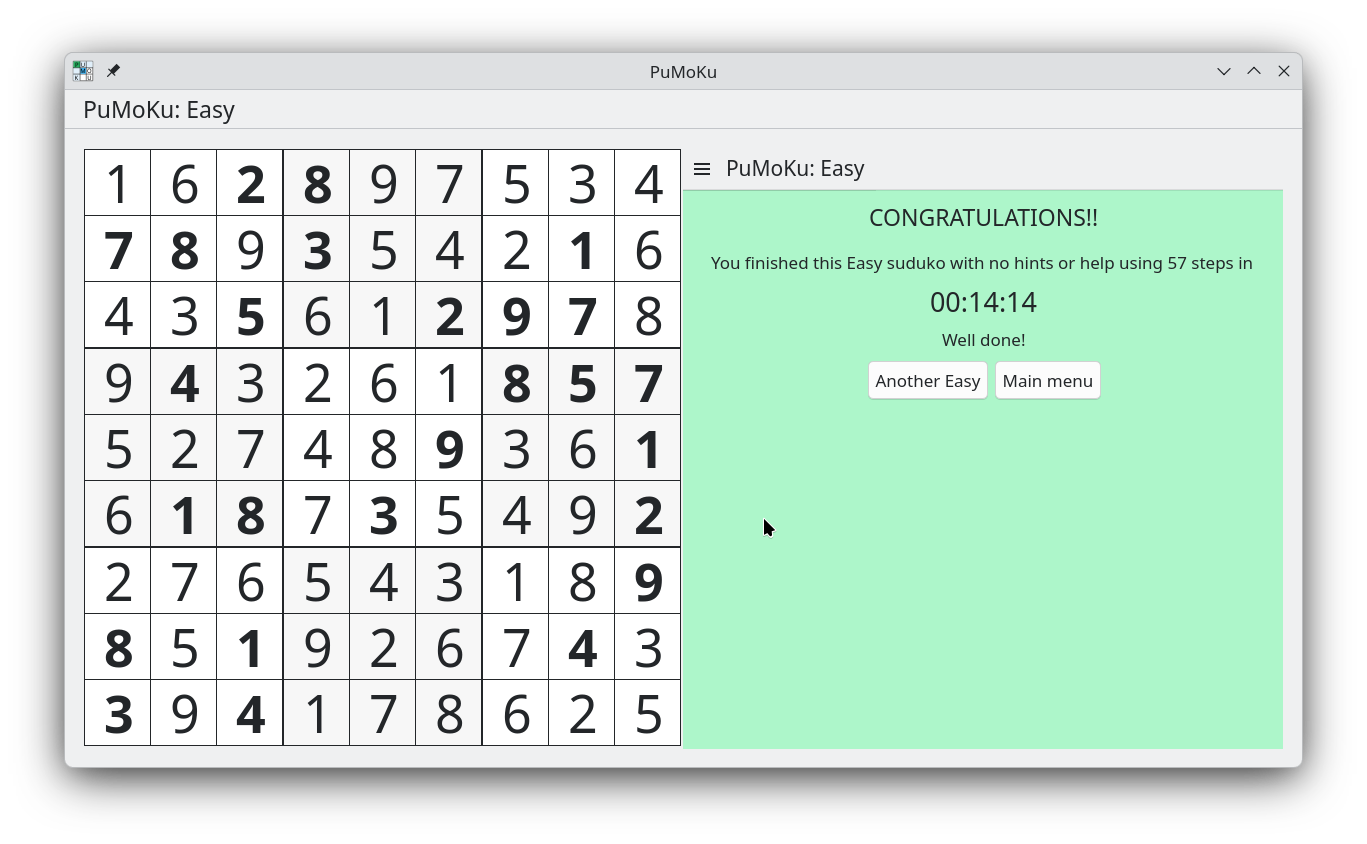
Anyway, I was wondering if you might want to make the lines thicker between the big blocks. I often found it hard to see which subblock I was in.
I think I also found a graphical glitch where it looks like a number is wrong even though it isn't.
-
@anderslund Nice! I just tried it out in tablet mode on my Tuxedo InfinityFlex (a 2-in-1). Works really well. I tried Simple mode which was a lot harder than I expected. Maybe I'm getting worse at this.
Anyway, I was wondering if you might want to make the lines thicker between the big blocks. I often found it hard to see which subblock I was in.
I think I also found a graphical glitch where it looks like a number is wrong even though it isn't.
@deathbydenim Thanks a lot!

I'll look into it, preferably I may prefer to make the contrast a bit higher. The blocks have shifting background clolors, using the view background and alternate view background colors from your color scheme, but maybe those colors arent contrasting enough? I have tested dark mode, but not much ...
-
@deathbydenim Thanks a lot!
I'll look into it, preferably I may prefer to make the contrast a bit higher. The blocks have shifting background clolors, using the view background and alternate view background colors from your color scheme, but maybe those colors arent contrasting enough? I have tested dark mode, but not much ...
@anderslund Oh yes, I did notice the contrast but that too was very hard to distinguish. I'm using the Breeze Dark system theme on KDE. It doesn't help that colours and contrasts are also monitor/screen dependent which makes things very tricky of course!
I also have old eyes.
-
@anderslund Nice! I just tried it out in tablet mode on my Tuxedo InfinityFlex (a 2-in-1). Works really well. I tried Simple mode which was a lot harder than I expected. Maybe I'm getting worse at this.
Anyway, I was wondering if you might want to make the lines thicker between the big blocks. I often found it hard to see which subblock I was in.
I think I also found a graphical glitch where it looks like a number is wrong even though it isn't.
@deathbydenim Btw, I also find the games somewhat hard somtimes. The trick is to look for hidden singles, there are not so many obvious ones even in simple games. Use same thinking as you would on paper, more or less. Or use pencilmarks, but simple and easy games should be managable without that
-
@anderslund Oh yes, I did notice the contrast but that too was very hard to distinguish. I'm using the Breeze Dark system theme on KDE. It doesn't help that colours and contrasts are also monitor/screen dependent which makes things very tricky of course!
I also have old eyes.
@deathbydenim The very high contrast between text and background in dark themes makes the 2px line look more than the thinner 1px, I think. This is breeze classic, which is quite good.
I'm not very keen on changing the line, as it would not look good with light colorschemes.
You can of course tweak your theme - lightening the alternate background a bit would help.
Using the system color scheme has been a clear concept for me while designing, but I can see also in breeze light colorscheme, the contrast between the blocks gets very low.
I have to go into thinking mode about this