“Bob, one of my employees can send email from his iPhone, but he’s not receiving any emails.”
-
“Bob, one of my employees can send email from his iPhone, but he’s not receiving any emails.”
Well, that’s backwards – usually I see problems the other way around; they can receive, but not send.
I tried working with him on a phone call yesterday morning, but when you can’t see the screen, tech support is more difficult. The client’s main business location is in a town less than an hour from my office, so I went to their location after lunch to work on it in person.
Oh, so many details were left out! It turned out that he wasn’t receiving emails on his iPhone, his iPad, or his laptop – but he could send from the phone and the laptop.
And... the problem started in March, and was continuous from then until now!
Okay. First things first. Let’s log into Outlook on the web and see whether that works. I’m starting to have a hunch that I’ve seen this problem before, with other clients.
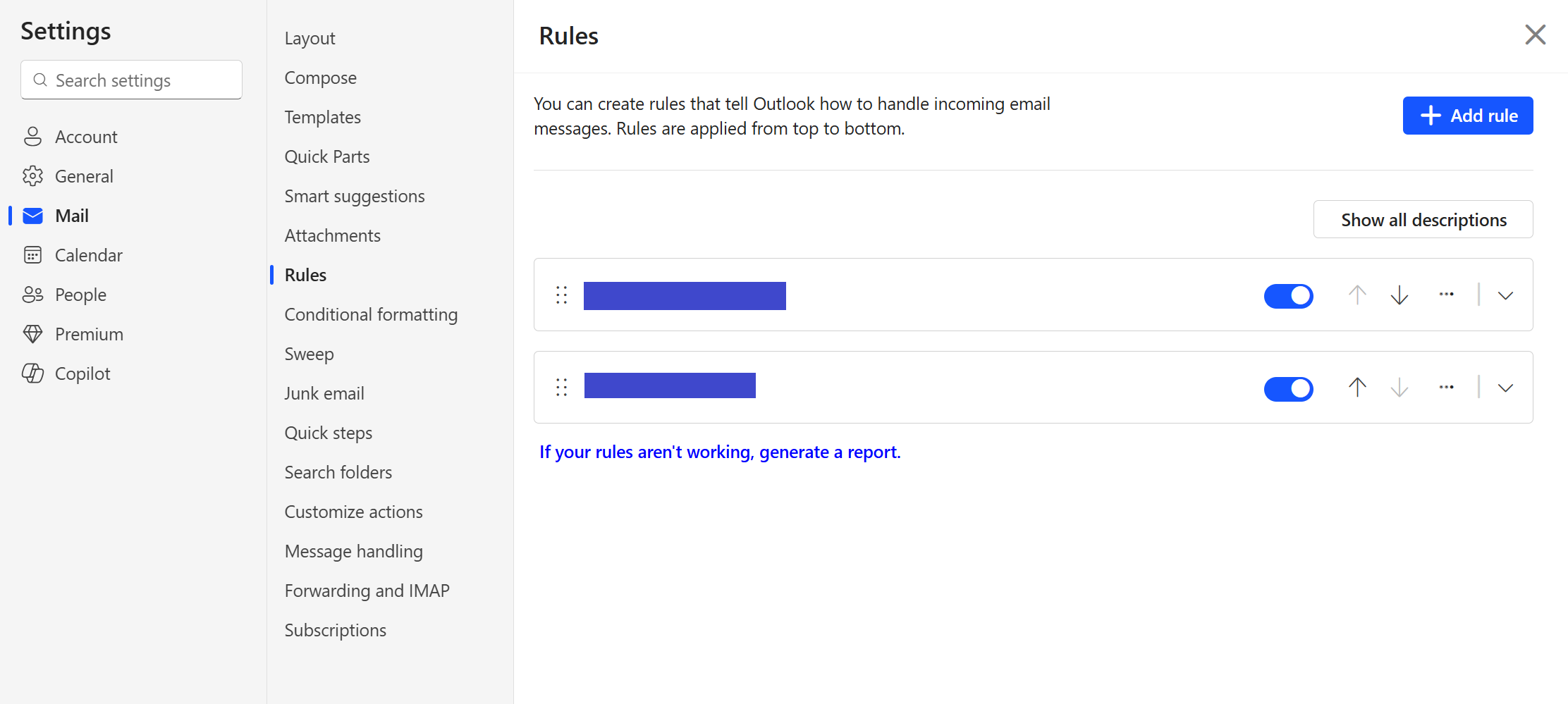
Outlook on the web looks the same. So I went into the Rules settings, and there was the culprit. The rule was named “....” That’s it, the only rule, and the rule name was just four dots. I clicked the drop-down arrow to expand the rule. And the rule said, on incoming mail, move it to the Deleted Items folder and mark it as read! So he was receiving email all along, he just didn’t know it.
I looked in the Deleted Items folder, and there were more than 1,300 messages, including my two test emails from earlier in the day. I moved everything back to the Inbox.
Here’s what happened. In March someone had started sending email pretending to be this employee. He changed his email password, and the outbound spam stopped. That’s all the company did. They thought the problem was solved.
Well, that locked the cybercriminal out, but it didn’t delete the rule that the cybercriminal had created to cover their activity. That rule didn’t get deleted until yesterday, June 24.
THE LESSON
If you believe your email has been compromised, after securing your account, log into each device, and especially the web instance, and look for rules you didn’t create. If a device was compromised, the malicious rule may be in Outlook’s rules on the device. This scenario can also happen in other email apps, like Thunderbird, and in other web-based email accounts, like Gmail. Whether it’s web-based or app-based, look for rules or filters that you were unaware of, and delete them.#CallMeIfYouNeedMe #FIFONetworks
Cybersecurity - Networks - Wireless – Telecom – VoIP
@fifonetworks wait wait wait. They couldn’t receive email for THEEE MONTHS?? I can’t work for 24h without email, what do they do?
-
@fifonetworks wait wait wait. They couldn’t receive email for THEEE MONTHS?? I can’t work for 24h without email, what do they do?
@Nicovel0
IKR? No way I could go three months without email. In this case, though, the employee is essentially a highly specialized mechanic - he repairs the machinery on commercial fishing vessels used to process and store the catch at sea. The only people contacting him by email work at the same company, and they were making do with phone calls and text messages. Too busy fixing stuff to worry about email until things slowed down. -
@fifonetworks I've seen a friend have a variation of that where the incoming emails were forwarded to the hacker's address. Luckily I was able to spot it and let them know by phone.
@smsm1
I see the surreptitious forwarding used in domestic abuse and stalking cases. That and the breach obfuscation I described are the two most common malicious rules. -
“Bob, one of my employees can send email from his iPhone, but he’s not receiving any emails.”
Well, that’s backwards – usually I see problems the other way around; they can receive, but not send.
I tried working with him on a phone call yesterday morning, but when you can’t see the screen, tech support is more difficult. The client’s main business location is in a town less than an hour from my office, so I went to their location after lunch to work on it in person.
Oh, so many details were left out! It turned out that he wasn’t receiving emails on his iPhone, his iPad, or his laptop – but he could send from the phone and the laptop.
And... the problem started in March, and was continuous from then until now!
Okay. First things first. Let’s log into Outlook on the web and see whether that works. I’m starting to have a hunch that I’ve seen this problem before, with other clients.
Outlook on the web looks the same. So I went into the Rules settings, and there was the culprit. The rule was named “....” That’s it, the only rule, and the rule name was just four dots. I clicked the drop-down arrow to expand the rule. And the rule said, on incoming mail, move it to the Deleted Items folder and mark it as read! So he was receiving email all along, he just didn’t know it.
I looked in the Deleted Items folder, and there were more than 1,300 messages, including my two test emails from earlier in the day. I moved everything back to the Inbox.
Here’s what happened. In March someone had started sending email pretending to be this employee. He changed his email password, and the outbound spam stopped. That’s all the company did. They thought the problem was solved.
Well, that locked the cybercriminal out, but it didn’t delete the rule that the cybercriminal had created to cover their activity. That rule didn’t get deleted until yesterday, June 24.
THE LESSON
If you believe your email has been compromised, after securing your account, log into each device, and especially the web instance, and look for rules you didn’t create. If a device was compromised, the malicious rule may be in Outlook’s rules on the device. This scenario can also happen in other email apps, like Thunderbird, and in other web-based email accounts, like Gmail. Whether it’s web-based or app-based, look for rules or filters that you were unaware of, and delete them.#CallMeIfYouNeedMe #FIFONetworks
Cybersecurity - Networks - Wireless – Telecom – VoIP
@fifonetworks@infosec.eenfineerAnother lesson is to be precise when reporting issues, even if you don't think it matters!
The fact that you got there and it was way more complicated than "I can send but not receive" doesn't surprise me.
It reminds me of a story from a firmware engineer who worked on large machining equipment (like CNC and stuff). One of their first customers for a new product claimed that, without fail, it would crash right before starting a job. But they couldn't reproduce the issue in the QA lab. After a few back and forths he was flown out to the customer site see what was going on. So he gets there, they try to show him the bug but everything works fine. They can't reproduce it onsite either.
He fly's back home and the next day BAM, customer says its happening again. A crash before every single job like clockwork. So he catches the next plane back to the customer site and when they go to show him "the bug", it doesn't crash.
This time says "pretend I'm not here. Don't show me anything. Just do your job as normal". What's the first thing the operator does? Goes into a settings menu (that he hadn't touched once while trying to demonstrate the bug) and changes some parameters around for the REAL job. Boom crash.
You guessed it, there was an edge case around the limits of one of the params that they used for their real jobs, that no one ever thought to include in any of the bug tickets or complaints or phone calls.

 ️
️ -
@Nicovel0
IKR? No way I could go three months without email. In this case, though, the employee is essentially a highly specialized mechanic - he repairs the machinery on commercial fishing vessels used to process and store the catch at sea. The only people contacting him by email work at the same company, and they were making do with phone calls and text messages. Too busy fixing stuff to worry about email until things slowed down.@fifonetworks because of some unclear hacking situation we were once without email for 2 weeks, it took us months to recover. But then it’s unlikely any of us could fix a fishing vessel.
-
@fifonetworks@infosec.eenfineerAnother lesson is to be precise when reporting issues, even if you don't think it matters!
The fact that you got there and it was way more complicated than "I can send but not receive" doesn't surprise me.
It reminds me of a story from a firmware engineer who worked on large machining equipment (like CNC and stuff). One of their first customers for a new product claimed that, without fail, it would crash right before starting a job. But they couldn't reproduce the issue in the QA lab. After a few back and forths he was flown out to the customer site see what was going on. So he gets there, they try to show him the bug but everything works fine. They can't reproduce it onsite either.
He fly's back home and the next day BAM, customer says its happening again. A crash before every single job like clockwork. So he catches the next plane back to the customer site and when they go to show him "the bug", it doesn't crash.
This time says "pretend I'm not here. Don't show me anything. Just do your job as normal". What's the first thing the operator does? Goes into a settings menu (that he hadn't touched once while trying to demonstrate the bug) and changes some parameters around for the REAL job. Boom crash.
You guessed it, there was an edge case around the limits of one of the params that they used for their real jobs, that no one ever thought to include in any of the bug tickets or complaints or phone calls.
️@varx
That is so real-life in tech support! -
@fifonetworks It isn’t feasible in larger orgs. But at mine I do a quarterly rule check looking for oddball rules. We just had a user experience something similar but found the rule as part of a regular review of the audit trail and mailbox as part of the default post breach actions.
The Poweshell script is pretty simple to look for mailbox rules across the org.
@ryanl @fifonetworks I should suggest we do this at my work. This is a great idea.
-
“Bob, one of my employees can send email from his iPhone, but he’s not receiving any emails.”
Well, that’s backwards – usually I see problems the other way around; they can receive, but not send.
I tried working with him on a phone call yesterday morning, but when you can’t see the screen, tech support is more difficult. The client’s main business location is in a town less than an hour from my office, so I went to their location after lunch to work on it in person.
Oh, so many details were left out! It turned out that he wasn’t receiving emails on his iPhone, his iPad, or his laptop – but he could send from the phone and the laptop.
And... the problem started in March, and was continuous from then until now!
Okay. First things first. Let’s log into Outlook on the web and see whether that works. I’m starting to have a hunch that I’ve seen this problem before, with other clients.
Outlook on the web looks the same. So I went into the Rules settings, and there was the culprit. The rule was named “....” That’s it, the only rule, and the rule name was just four dots. I clicked the drop-down arrow to expand the rule. And the rule said, on incoming mail, move it to the Deleted Items folder and mark it as read! So he was receiving email all along, he just didn’t know it.
I looked in the Deleted Items folder, and there were more than 1,300 messages, including my two test emails from earlier in the day. I moved everything back to the Inbox.
Here’s what happened. In March someone had started sending email pretending to be this employee. He changed his email password, and the outbound spam stopped. That’s all the company did. They thought the problem was solved.
Well, that locked the cybercriminal out, but it didn’t delete the rule that the cybercriminal had created to cover their activity. That rule didn’t get deleted until yesterday, June 24.
THE LESSON
If you believe your email has been compromised, after securing your account, log into each device, and especially the web instance, and look for rules you didn’t create. If a device was compromised, the malicious rule may be in Outlook’s rules on the device. This scenario can also happen in other email apps, like Thunderbird, and in other web-based email accounts, like Gmail. Whether it’s web-based or app-based, look for rules or filters that you were unaware of, and delete them.#CallMeIfYouNeedMe #FIFONetworks
Cybersecurity - Networks - Wireless – Telecom – VoIP
@fifonetworks @Maker_of_Things That exact same thing happened last week to my neighbor. They ordered a bunch of stuff with her PayPal and also tried to get a multisim to catch her SMS authentications.
-
@kris @fifonetworks It does in most situations. Which is true of almost any MFA solution. But there are always going to be some sort of vulnerability you need to watch out for.
Microsoft is far from perfect but they are also one of the largest corporate email providers which makes them a natural target. AI certainly isn’t making it any easier.
@ryanl @fifonetworks
Sorry @RyanLodter but I disagree. They pushed this to everyone breaking decades of workflow while forcing employees in some positions to use their personal devices. Then when it did not really work they are not disclosing this to the public (I am a partner and get their security updates). On top of that I had a client whose tenant was taken over (even with MFA) and it took legal threats and over a month to get it resolved. This is not the actions of a responsible company. -
“Bob, one of my employees can send email from his iPhone, but he’s not receiving any emails.”
Well, that’s backwards – usually I see problems the other way around; they can receive, but not send.
I tried working with him on a phone call yesterday morning, but when you can’t see the screen, tech support is more difficult. The client’s main business location is in a town less than an hour from my office, so I went to their location after lunch to work on it in person.
Oh, so many details were left out! It turned out that he wasn’t receiving emails on his iPhone, his iPad, or his laptop – but he could send from the phone and the laptop.
And... the problem started in March, and was continuous from then until now!
Okay. First things first. Let’s log into Outlook on the web and see whether that works. I’m starting to have a hunch that I’ve seen this problem before, with other clients.
Outlook on the web looks the same. So I went into the Rules settings, and there was the culprit. The rule was named “....” That’s it, the only rule, and the rule name was just four dots. I clicked the drop-down arrow to expand the rule. And the rule said, on incoming mail, move it to the Deleted Items folder and mark it as read! So he was receiving email all along, he just didn’t know it.
I looked in the Deleted Items folder, and there were more than 1,300 messages, including my two test emails from earlier in the day. I moved everything back to the Inbox.
Here’s what happened. In March someone had started sending email pretending to be this employee. He changed his email password, and the outbound spam stopped. That’s all the company did. They thought the problem was solved.
Well, that locked the cybercriminal out, but it didn’t delete the rule that the cybercriminal had created to cover their activity. That rule didn’t get deleted until yesterday, June 24.
THE LESSON
If you believe your email has been compromised, after securing your account, log into each device, and especially the web instance, and look for rules you didn’t create. If a device was compromised, the malicious rule may be in Outlook’s rules on the device. This scenario can also happen in other email apps, like Thunderbird, and in other web-based email accounts, like Gmail. Whether it’s web-based or app-based, look for rules or filters that you were unaware of, and delete them.#CallMeIfYouNeedMe #FIFONetworks
Cybersecurity - Networks - Wireless – Telecom – VoIP
@fifonetworks Is there a way to backup/restore all settings related to a mailbox? Or to get an audit trail of changes to the settings?
-
“Bob, one of my employees can send email from his iPhone, but he’s not receiving any emails.”
Well, that’s backwards – usually I see problems the other way around; they can receive, but not send.
I tried working with him on a phone call yesterday morning, but when you can’t see the screen, tech support is more difficult. The client’s main business location is in a town less than an hour from my office, so I went to their location after lunch to work on it in person.
Oh, so many details were left out! It turned out that he wasn’t receiving emails on his iPhone, his iPad, or his laptop – but he could send from the phone and the laptop.
And... the problem started in March, and was continuous from then until now!
Okay. First things first. Let’s log into Outlook on the web and see whether that works. I’m starting to have a hunch that I’ve seen this problem before, with other clients.
Outlook on the web looks the same. So I went into the Rules settings, and there was the culprit. The rule was named “....” That’s it, the only rule, and the rule name was just four dots. I clicked the drop-down arrow to expand the rule. And the rule said, on incoming mail, move it to the Deleted Items folder and mark it as read! So he was receiving email all along, he just didn’t know it.
I looked in the Deleted Items folder, and there were more than 1,300 messages, including my two test emails from earlier in the day. I moved everything back to the Inbox.
Here’s what happened. In March someone had started sending email pretending to be this employee. He changed his email password, and the outbound spam stopped. That’s all the company did. They thought the problem was solved.
Well, that locked the cybercriminal out, but it didn’t delete the rule that the cybercriminal had created to cover their activity. That rule didn’t get deleted until yesterday, June 24.
THE LESSON
If you believe your email has been compromised, after securing your account, log into each device, and especially the web instance, and look for rules you didn’t create. If a device was compromised, the malicious rule may be in Outlook’s rules on the device. This scenario can also happen in other email apps, like Thunderbird, and in other web-based email accounts, like Gmail. Whether it’s web-based or app-based, look for rules or filters that you were unaware of, and delete them.#CallMeIfYouNeedMe #FIFONetworks
Cybersecurity - Networks - Wireless – Telecom – VoIP
Good point on the web interface. I found out last month that the outlook desktop app won't show you the rules created on the web. It _might_ show a message that there are rules it doesn't show you.
-
 J jwcph@helvede.net shared this topic