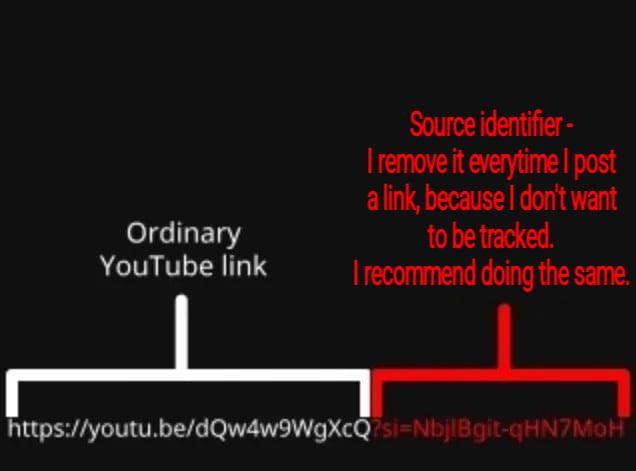
The actual ‘video ID’ is the random string after:
-
-
The actual ‘video ID’ is the random string after:
youtube.com/watch?v=
If there is a “&” or “?” with another random string that is the tracker
You can delete everything after the after the first random string starting with the “&”
Or don’t use #YouTube!
@stux I do the same.
-
The actual ‘video ID’ is the random string after:
youtube.com/watch?v=
If there is a “&” or “?” with another random string that is the tracker
You can delete everything after the after the first random string starting with the “&”
Or don’t use #YouTube!
@stux I routinely remove it too and it's funny, I didn't know it was a tracker, I just thought it was messy unnecessary junk and I didn't trust it. Which, I mean, yeah
-
The actual ‘video ID’ is the random string after:
youtube.com/watch?v=
If there is a “&” or “?” with another random string that is the tracker
You can delete everything after the after the first random string starting with the “&”
Or don’t use #YouTube!
@stux People dont listen Stux I told them a bazillion times I also shared 4 to 5 cross platform & cross browser, ways to tell them and yet still I see them sharing the tracking URLs.
-
@stux there are a ton of browser plugins that can do that for you. I've used this one before https://github.com/ClearURLs/Addon
Granted that doesn't help on mobile so much.
@Tekchip @stux you can install the above in the mobile version of Firefox/waterfox.
To ensure its used for YouTube on mobile, you need to disable the YouTube app on android. They dont allow you to uninstall it without root, but it will stay disabled. Any YouTube links will then open in your browser instead.
This has the added benefit of letting you use extensions like ublock origin and unhook to de-enshitify YouTube on mobile too boot.
-
The actual ‘video ID’ is the random string after:
youtube.com/watch?v=
If there is a “&” or “?” with another random string that is the tracker
You can delete everything after the after the first random string starting with the “&”
Or don’t use #YouTube!
@stux Or you can use https://invidious.nerdvpn.de/watch?v=42iVcEg5SOM
-
The actual ‘video ID’ is the random string after:
youtube.com/watch?v=
If there is a “&” or “?” with another random string that is the tracker
You can delete everything after the after the first random string starting with the “&”
Or don’t use #YouTube!
@stux hidden rickroll spotted

-
The actual ‘video ID’ is the random string after:
youtube.com/watch?v=
If there is a “&” or “?” with another random string that is the tracker
You can delete everything after the after the first random string starting with the “&”
Or don’t use #YouTube!
@stux
Weirdly, when I copy a Youtube link from my browser it doesn't have those. Do they only get added if you click some "share" button? -
The actual ‘video ID’ is the random string after:
youtube.com/watch?v=
If there is a “&” or “?” with another random string that is the tracker
You can delete everything after the after the first random string starting with the “&”
Or don’t use #YouTube!
@stux Creators have to go nowhere (especially if they want to earn money):
- PeerTube has zero monetization whatsoever, except for the Donate button;
- Rumble is far-right;
- Odysse had a crypto controversy in the past;
- VK Video/Rutube not only russian, but also barely pay you and promote you (as a creator), preffering to promote whoever paid them;
- Vimeo/Daily motion and every other platform have zero monetization, or even require you to pay to upload.
And most importantly, no other platform is as big as YouTube to compete against. So even creators present on PeerTube have to mirror their content to YouTube, unless it violates YouTube's ToS. -
The actual ‘video ID’ is the random string after:
youtube.com/watch?v=
If there is a “&” or “?” with another random string that is the tracker
You can delete everything after the after the first random string starting with the “&”
Or don’t use #YouTube!
@stux what is that compression? blurry red over black... not ideal to be read
also we need more usless back margin on top

-
The actual ‘video ID’ is the random string after:
youtube.com/watch?v=
If there is a “&” or “?” with another random string that is the tracker
You can delete everything after the after the first random string starting with the “&”
Or don’t use #YouTube!
@stux Generally, I find all that source gunk is added when the video is in a list, but copying the link from a video being played doesn't add it (thereby avoiding having to remove it when pasting it somewhere).
-
The actual ‘video ID’ is the random string after:
youtube.com/watch?v=
If there is a “&” or “?” with another random string that is the tracker
You can delete everything after the after the first random string starting with the “&”
Or don’t use #YouTube!
@stux > XcQ
-
@Tekchip @stux you can install the above in the mobile version of Firefox/waterfox.
To ensure its used for YouTube on mobile, you need to disable the YouTube app on android. They dont allow you to uninstall it without root, but it will stay disabled. Any YouTube links will then open in your browser instead.
This has the added benefit of letting you use extensions like ublock origin and unhook to de-enshitify YouTube on mobile too boot.
@liquidlamp @Tekchip @stux Is there any way to cut it on the firewall formula on main router? (Mikrotik or other?)
-
The actual ‘video ID’ is the random string after:
youtube.com/watch?v=
If there is a “&” or “?” with another random string that is the tracker
You can delete everything after the after the first random string starting with the “&”
Or don’t use #YouTube!
@stux Just noting that your example link isn't one that uses "?v=", which could conceivably confuse someone. (Hopefully it won't, but there are a surprising number of ways in which people can be confused.)
-
@Kierkegaanks @stux Not everyone can remember detail, or even see it, or absorb explanations that aren't tailored to how they learn. I don't believe most are refusing.
-
@stux Just noting that your example link isn't one that uses "?v=", which could conceivably confuse someone. (Hopefully it won't, but there are a surprising number of ways in which people can be confused.)
@timtfj That’s true!
The shortened url is really crappy from YT, maybe I’ll should add an extra explainer
-
@timtfj That’s true!
The shortened url is really crappy from YT, maybe I’ll should add an extra explainer
@stux I wonder if that's part of the issue. A shortened link that's that long doesn't look shortened, just different. So people are even more unsure about what can be safely cut out.
-
awesome, thank you!
-
 J jwcph@helvede.net shared this topic