I wanted to set up presence detection in Home Assistant without exposing my installation to the internet, and without giving the companion app on my phone access to location data.
-
I wanted to set up presence detection in Home Assistant without exposing my installation to the internet, and without giving the companion app on my phone access to location data.
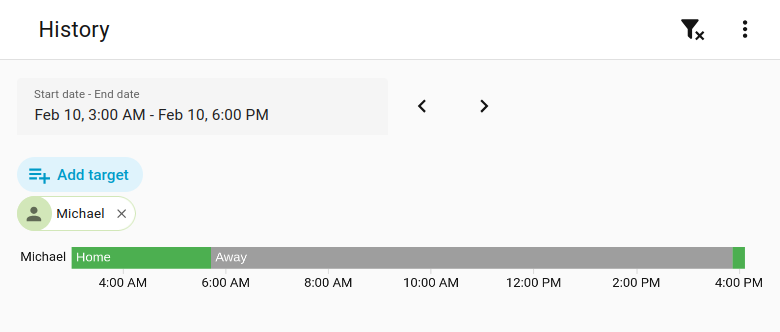
I use MikroTik network gear at home, so I added the Mikrotik integration to Home Assistant. It showed my phone as a MAC address, connected through Wifi, and I used that as device tracker. Everything seemed fine, but then the next afternoon. the device tracker still showed me as Away.
I then discovered that GrapheneOS (edit: Android rather, see below) uses a different random MAC address for each connection to a network, as default. Changed it to use a static random MAC for my home network, and now it works as intended.
All this to avoid running the Morning Coffee automation if I'm not even home.
-
I wanted to set up presence detection in Home Assistant without exposing my installation to the internet, and without giving the companion app on my phone access to location data.
I use MikroTik network gear at home, so I added the Mikrotik integration to Home Assistant. It showed my phone as a MAC address, connected through Wifi, and I used that as device tracker. Everything seemed fine, but then the next afternoon. the device tracker still showed me as Away.
I then discovered that GrapheneOS (edit: Android rather, see below) uses a different random MAC address for each connection to a network, as default. Changed it to use a static random MAC for my home network, and now it works as intended.
All this to avoid running the Morning Coffee automation if I'm not even home.
@mjack this is a standard Android feature, at least in ASOP the rotating MAC is normal. FYI
-
@mjack this is a standard Android feature, at least in ASOP the rotating MAC is normal. FYI
Thanks, I didn't know that, updated my post. The phone only had Android on for as long as it took to install GrapheneOS.
-
I wanted to set up presence detection in Home Assistant without exposing my installation to the internet, and without giving the companion app on my phone access to location data.
I use MikroTik network gear at home, so I added the Mikrotik integration to Home Assistant. It showed my phone as a MAC address, connected through Wifi, and I used that as device tracker. Everything seemed fine, but then the next afternoon. the device tracker still showed me as Away.
I then discovered that GrapheneOS (edit: Android rather, see below) uses a different random MAC address for each connection to a network, as default. Changed it to use a static random MAC for my home network, and now it works as intended.
All this to avoid running the Morning Coffee automation if I'm not even home.
@mjack I'd like a 'static random MAC'.
-
@mjack I'd like a 'static random MAC'.
They are called "Use per-connection randomized MAC" and "Use per-network randomized MAC" in settings.
Are you randomly mocking me?

-
I wanted to set up presence detection in Home Assistant without exposing my installation to the internet, and without giving the companion app on my phone access to location data.
I use MikroTik network gear at home, so I added the Mikrotik integration to Home Assistant. It showed my phone as a MAC address, connected through Wifi, and I used that as device tracker. Everything seemed fine, but then the next afternoon. the device tracker still showed me as Away.
I then discovered that GrapheneOS (edit: Android rather, see below) uses a different random MAC address for each connection to a network, as default. Changed it to use a static random MAC for my home network, and now it works as intended.
All this to avoid running the Morning Coffee automation if I'm not even home.
@mjack have you considered using Owntracks and integrating that into your HomeAssistant? In that case you'd only need to expose a MQTT server where the phone would be pushing its location, you could even set up a dedicated MQTT server just for this purpose and bridge the owntracks topic to your main instance to avoid exposing other sensitive data.
-
@mjack have you considered using Owntracks and integrating that into your HomeAssistant? In that case you'd only need to expose a MQTT server where the phone would be pushing its location, you could even set up a dedicated MQTT server just for this purpose and bridge the owntracks topic to your main instance to avoid exposing other sensitive data.
I hadn't, but I only want to detect if my phone is home or not, and make that information available to Home Assistant.
In a previous thread someone suggested setting up a Bluetooth connection between the phone and Home Assistant, but the MikroTik integration seems even simpler to me.
-
@mjack this is a standard Android feature, at least in ASOP the rotating MAC is normal. FYI
@DonTheMaster @mjack It is. And just to add: using a static MAC on mobile devices *to a specific WiFi network* also makes implementing a DNSBL server like AdGuard Home or Pi-hole much easier.
-
They are called "Use per-connection randomized MAC" and "Use per-network randomized MAC" in settings.
Are you randomly mocking me?
@mjack not mocking and its understandable but made me smile.