I'm on Linux.
-
I'm on Linux. I have an SD card which has been giving me a number of strange problems for a while now. It now appears to have wiped itself completely. Looking in GNOME disks the main partition, which I expect to be exfat, is of type "unknown". If I run fsck.exfat, It claims it's not a valid exfat image.
Windows refuses to even look at it.
Before I destructively image the disk, do you think there is ANYTHING else I can/should try to see if the data is still easily recoverable?
@mcc Other advice to make a copy and then use testdisk / photorec are good. But if you haven't checked with a known good card already, maybe the reader / adapter could be an issue too?
-
I'm on Linux. I have an SD card which has been giving me a number of strange problems for a while now. It now appears to have wiped itself completely. Looking in GNOME disks the main partition, which I expect to be exfat, is of type "unknown". If I run fsck.exfat, It claims it's not a valid exfat image.
Windows refuses to even look at it.
Before I destructively image the disk, do you think there is ANYTHING else I can/should try to see if the data is still easily recoverable?
@mcc I see that other people have already mentioned them, but the right answer is testdisk/photorec and I've seen them save the day more than a few times.
-
I'm on Linux. I have an SD card which has been giving me a number of strange problems for a while now. It now appears to have wiped itself completely. Looking in GNOME disks the main partition, which I expect to be exfat, is of type "unknown". If I run fsck.exfat, It claims it's not a valid exfat image.
Windows refuses to even look at it.
Before I destructively image the disk, do you think there is ANYTHING else I can/should try to see if the data is still easily recoverable?
@mcc Best you can do is image the device - if it is readable at all - and work with that. Do NOT try to work with the device directly if you can avoid it. Corruption lies in that direction. From now on treat it as read only (which also means not attempting to mount it, again).
-
@mcc Best you can do is image the device - if it is readable at all - and work with that. Do NOT try to work with the device directly if you can avoid it. Corruption lies in that direction. From now on treat it as read only (which also means not attempting to mount it, again).
@mcc There are forensic tools which will help make sense of the image if you can get one at all. Binwalk on the image, for starters. A bit overblown for your use case, but there's also Sleuthkit and Autopsy (proper forensic tools, which are great for data recovery, if you have the time and dedication).
-
I'm on Linux. I have an SD card which has been giving me a number of strange problems for a while now. It now appears to have wiped itself completely. Looking in GNOME disks the main partition, which I expect to be exfat, is of type "unknown". If I run fsck.exfat, It claims it's not a valid exfat image.
Windows refuses to even look at it.
Before I destructively image the disk, do you think there is ANYTHING else I can/should try to see if the data is still easily recoverable?
@mcc
TestDisk might work but haven't tried it with exfat. It's very good for Linux filesystems. https://www.cgsecurity.org/wiki/TestDisk_Download -
I'm on Linux. I have an SD card which has been giving me a number of strange problems for a while now. It now appears to have wiped itself completely. Looking in GNOME disks the main partition, which I expect to be exfat, is of type "unknown". If I run fsck.exfat, It claims it's not a valid exfat image.
Windows refuses to even look at it.
Before I destructively image the disk, do you think there is ANYTHING else I can/should try to see if the data is still easily recoverable?
@mcc This sort of thing but without the live Linux USB?
https://www.thelinuxvault.net/linux-backup-recovery/step-by-step-linux-data-recovery-tutorial/
-
@mcc This sort of thing but without the live Linux USB?
https://www.thelinuxvault.net/linux-backup-recovery/step-by-step-linux-data-recovery-tutorial/
@mcc I'd go down straight to the "make an image" bit first.
-
I'm on Linux. I have an SD card which has been giving me a number of strange problems for a while now. It now appears to have wiped itself completely. Looking in GNOME disks the main partition, which I expect to be exfat, is of type "unknown". If I run fsck.exfat, It claims it's not a valid exfat image.
Windows refuses to even look at it.
Before I destructively image the disk, do you think there is ANYTHING else I can/should try to see if the data is still easily recoverable?
Probably tosst. What does fdisk -l /dev/sda report?
-
I'm on Linux. I have an SD card which has been giving me a number of strange problems for a while now. It now appears to have wiped itself completely. Looking in GNOME disks the main partition, which I expect to be exfat, is of type "unknown". If I run fsck.exfat, It claims it's not a valid exfat image.
Windows refuses to even look at it.
Before I destructively image the disk, do you think there is ANYTHING else I can/should try to see if the data is still easily recoverable?
@mcc I've had good results with ddrescue and external drives.
-
@mcc I've had good results with ddrescue and external drives.
-
I'm on Linux. I have an SD card which has been giving me a number of strange problems for a while now. It now appears to have wiped itself completely. Looking in GNOME disks the main partition, which I expect to be exfat, is of type "unknown". If I run fsck.exfat, It claims it's not a valid exfat image.
Windows refuses to even look at it.
Before I destructively image the disk, do you think there is ANYTHING else I can/should try to see if the data is still easily recoverable?
@mcc second photorec. I've recovered files from borked SD cards using it on Ubuntu
-
Probably tosst. What does fdisk -l /dev/sda report?
@SpaceLifeForm without trying, I'd guess it reports that my internal drive (not exfat) is not exfat?
-
@SpaceLifeForm without trying, I'd guess it reports that my internal drive (not exfat) is not exfat?
-
@SpaceLifeForm without trying, I'd guess it reports that my internal drive (not exfat) is not exfat?
-
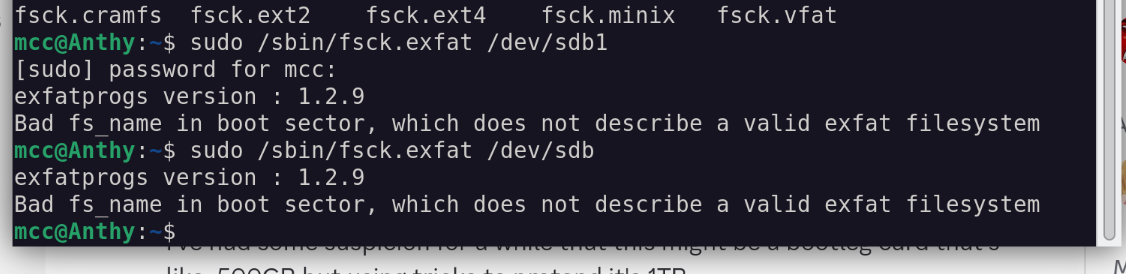
@SpaceLifeForm It's in the screenshot above
-
@SpaceLifeForm im watching anime
-
@SpaceLifeForm It's in the screenshot above
@mcc @SpaceLifeForm It doesn't. Your screenshot shows running
fscknotfdisk.The latter will read the partition table and print it out for you, including telling you what kind of partitions it has and whether there are overlapping ones.
One thing to try (besides just copying the disk, which you should do) is to see if the
fileutility has any idea about what's stored in that partition. Something likesudo dd if=/dev/sdb1 bs=512 count=4 | file -I've seen plenty of USB disks that appear not to have a proper partition table or boot sector, but they still work fine as a boot disk. I'm not sure if you remember writing the image (I always promptly forget which disk has what on it) but that might be the case here?
Anyway, copy the disk, save the image and you can work from that later. Just make sure that the tool you use detects and records any read errors.
(under Linux, you can use loopback mounts to mount from an image at a given offset instead of using a physical disk)
-
@mcc @SpaceLifeForm It doesn't. Your screenshot shows running
fscknotfdisk.The latter will read the partition table and print it out for you, including telling you what kind of partitions it has and whether there are overlapping ones.
One thing to try (besides just copying the disk, which you should do) is to see if the
fileutility has any idea about what's stored in that partition. Something likesudo dd if=/dev/sdb1 bs=512 count=4 | file -I've seen plenty of USB disks that appear not to have a proper partition table or boot sector, but they still work fine as a boot disk. I'm not sure if you remember writing the image (I always promptly forget which disk has what on it) but that might be the case here?
Anyway, copy the disk, save the image and you can work from that later. Just make sure that the tool you use detects and records any read errors.
(under Linux, you can use loopback mounts to mount from an image at a given offset instead of using a physical disk)
@muddle @SpaceLifeForm Oh. Thanks. I misread.
I'll try that one tomorrow, along with the other suggestions. Thanks.
-
I'm on Linux. I have an SD card which has been giving me a number of strange problems for a while now. It now appears to have wiped itself completely. Looking in GNOME disks the main partition, which I expect to be exfat, is of type "unknown". If I run fsck.exfat, It claims it's not a valid exfat image.
Windows refuses to even look at it.
Before I destructively image the disk, do you think there is ANYTHING else I can/should try to see if the data is still easily recoverable?
@mcc@mastodon.social
The suggestion at the end of this might be a viable option.
Use application, 'testdisk' to analyze without writing any changes. If it can detect the lost exfat tables then it can be recovered. I have done this with multiple failed media and drives. Be sure to read the documentation carefully before running it.
Exfat writes a backup boot region. Testdisk should be able to check for this.
If that doesn't work there is ddrescue and photorec for finding and recovering individual files.
You might also use 'dd' to raw copy the damaged volume to an image file and write that image file to other external media then try running 'testdisk' and other tools on the copy. You can keep the image file as a backup as you try to recover the data from a copy first, to avoid the risk of further damage to the card.
-
@mcc Image the whole SD to a file, then take a copy of the file and work solely with the copy.
ddrescue may be a good way to make that image, depending on how the SD card has failed.
Then something like TestDisk might help recover files.