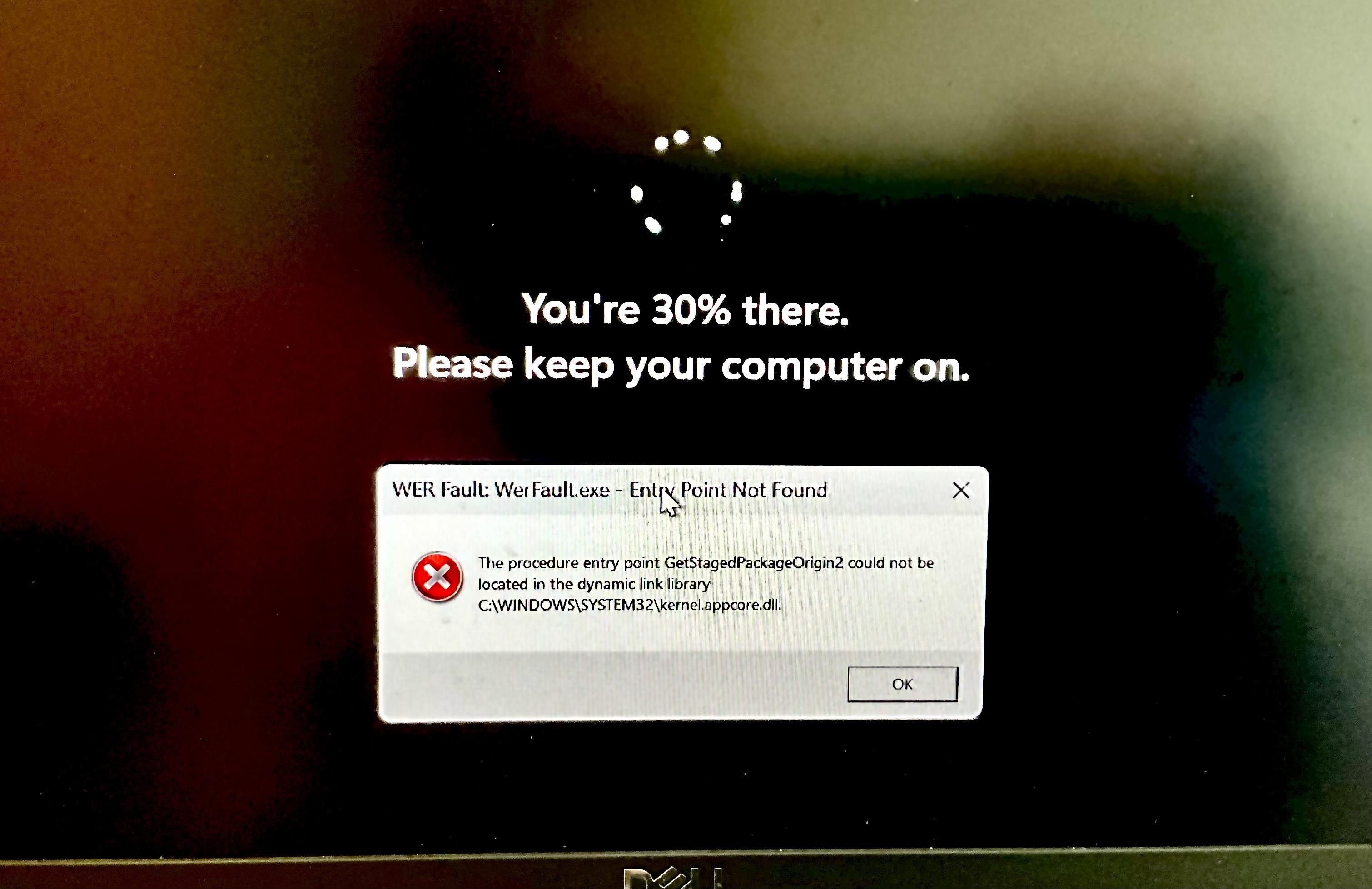
well this is the scariest thing my work computer has ever done.
-
well this is the scariest thing my work computer has ever done. I didn’t even know it was structurally possible for popup windows to appear over the Windows Update screen
@0xabad1dea wow that looks like an impressive fuckup, hope the system isn't rendered completely unusable.
-
well this is the scariest thing my work computer has ever done. I didn’t even know it was structurally possible for popup windows to appear over the Windows Update screen
@0xabad1dea that's so bad it's art.
-
@0xabad1dea@infosec.exchange Leave it to windows to fuck up even the simplest of procedures
@xaetacore okay yes it does do that sometimes, but system update is pretty much The most complicated procedure
-
well this is the scariest thing my work computer has ever done. I didn’t even know it was structurally possible for popup windows to appear over the Windows Update screen
@0xabad1dea that procedure entry point definitely got staged
-
@xaetacore okay yes it does do that sometimes, but system update is pretty much The most complicated procedure
@0xabad1dea@infosec.exchange Guess thats the case on windows lol, On Linux its very trivial and simple, Fetch Package, Unpack package, Merge extracted package into root -
well this is the scariest thing my work computer has ever done. I didn’t even know it was structurally possible for popup windows to appear over the Windows Update screen
@0xabad1dea I've had popups caused by bad Logitech software show up like that in the past
-
@0xabad1dea@infosec.exchange Guess thats the case on windows lol, On Linux its very trivial and simple, Fetch Package, Unpack package, Merge extracted package into root
@xaetacore oh I'm sure it's very simple for you to click the button after someone else put in all the work to be sure it will work, yes.
-
well this is the scariest thing my work computer has ever done. I didn’t even know it was structurally possible for popup windows to appear over the Windows Update screen
@0xabad1dea computers can do anything these days! Truly amazing
real talk I think the update screen is just a full screen application. I managed to tab out of it this one time
-
well this is the scariest thing my work computer has ever done. I didn’t even know it was structurally possible for popup windows to appear over the Windows Update screen
@0xabad1dea that is NtRaiseHardError, and win32 is all up and running to display the login screen which displays that progress, i think the scariest thing about this is that it failed to launch werfault which means something crashed -
well this is the scariest thing my work computer has ever done. I didn’t even know it was structurally possible for popup windows to appear over the Windows Update screen
to my genuine but relieved surprise, it still booted after this.
what's truly mystifying, however, is how the Dell firmware manages to have two or three
 ️Critical️ bios updates a week. I understand neither where they're all coming from nor how Dell sustains such a rapid release cycle of high-risk firmware patches long-term.
 -
well this is the scariest thing my work computer has ever done. I didn’t even know it was structurally possible for popup windows to appear over the Windows Update screen
@0xabad1dea@infosec.exchange oh yeah Signal always pops up a window like this with a memory fault error when I power off my Windows install

-
to my genuine but relieved surprise, it still booted after this.
what's truly mystifying, however, is how the Dell firmware manages to have two or three
️Critical️ bios updates a week. I understand neither where they're all coming from nor how Dell sustains such a rapid release cycle of high-risk firmware patches long-term.@0xabad1dea little to no testing would be my guess
-
to my genuine but relieved surprise, it still booted after this.
what's truly mystifying, however, is how the Dell firmware manages to have two or three
️Critical️ bios updates a week. I understand neither where they're all coming from nor how Dell sustains such a rapid release cycle of high-risk firmware patches long-term.@0xabad1dea I have a Lenovo that did something like 7 bios updates in the same day, laptop was disconnected for a while, but instead of doing last one windows update makes it step each one at a time.
Also if you had a critical error before it's a good idea to do a sfc /scannow I was sceptic before but that command fixs a lot of corrupted files all the time.
-
@xaetacore oh I'm sure it's very simple for you to click the button after someone else put in all the work to be sure it will work, yes.
@0xabad1dea@infosec.exchange I write and maintain gentoo ebuilds lol, i am very familiar with the process of writing ebuilds, RPMs, Debs and Pkgbuilds, as well as manual source compiles and installations -
to my genuine but relieved surprise, it still booted after this.
what's truly mystifying, however, is how the Dell firmware manages to have two or three
️Critical️ bios updates a week. I understand neither where they're all coming from nor how Dell sustains such a rapid release cycle of high-risk firmware patches long-term.@0xabad1dea those firmware updates give me a great excuse to do nothing for several minutes while it updates & reboots, which perhaps the firmware writers also appreciate
-
@0xabad1dea@infosec.exchange I write and maintain gentoo ebuilds lol, i am very familiar with the process of writing ebuilds, RPMs, Debs and Pkgbuilds, as well as manual source compiles and installations@0xabad1dea@infosec.exchange writing packages is different from installing them or updating them. The same goes for windows.
The process of installing or updating is exactly as I described on most distributions.
The way it is able to track the files.It installs is partially also because of the fake root it puts them in before merging it with the real root -
to my genuine but relieved surprise, it still booted after this.
what's truly mystifying, however, is how the Dell firmware manages to have two or three
️Critical️ bios updates a week. I understand neither where they're all coming from nor how Dell sustains such a rapid release cycle of high-risk firmware patches long-term.@0xabad1dea yeah, now I remember that in Big Corporate we've had Dell firmware updates quite often (whitelabeled by the corporate though)
-
to my genuine but relieved surprise, it still booted after this.
what's truly mystifying, however, is how the Dell firmware manages to have two or three
️Critical️ bios updates a week. I understand neither where they're all coming from nor how Dell sustains such a rapid release cycle of high-risk firmware patches long-term.@0xabad1dea This is interesting, I use linux on my Dell, so does my better half and there's no firmware updates unless we say so
 ️
️ -
@0xabad1dea This is interesting, I use linux on my Dell, so does my better half and there's no firmware updates unless we say so
️@Iloo I'm confused why you think that's different from Windows? the updates exist whether you choose to install them or not, in either case
-
to my genuine but relieved surprise, it still booted after this.
what's truly mystifying, however, is how the Dell firmware manages to have two or three
️Critical️ bios updates a week. I understand neither where they're all coming from nor how Dell sustains such a rapid release cycle of high-risk firmware patches long-term.@0xabad1dea I imagine it's unsustainable