Skip to content
  • Hjem
  • Seneste
  • Etiketter
  • Populære
  • Verden
  • Bruger
  • Grupper
Temaer
  • Light
  • Brite
  • Cerulean
  • Cosmo
  • Flatly
  • Journal
  • Litera
  • Lumen
  • Lux
  • Materia
  • Minty
  • Morph
  • Pulse
  • Sandstone
  • Simplex
  • Sketchy
  • Spacelab
  • United
  • Yeti
  • Zephyr
  • Dark
  • Cyborg
  • Darkly
  • Quartz
  • Slate
  • Solar
  • Superhero
  • Vapor

  • Default (No Skin)
  • No Skin
Kollaps
FARVEL BIG TECH
  1. Forside
  2. Ikke-kategoriseret
  3. well this is the scariest thing my work computer has ever done.
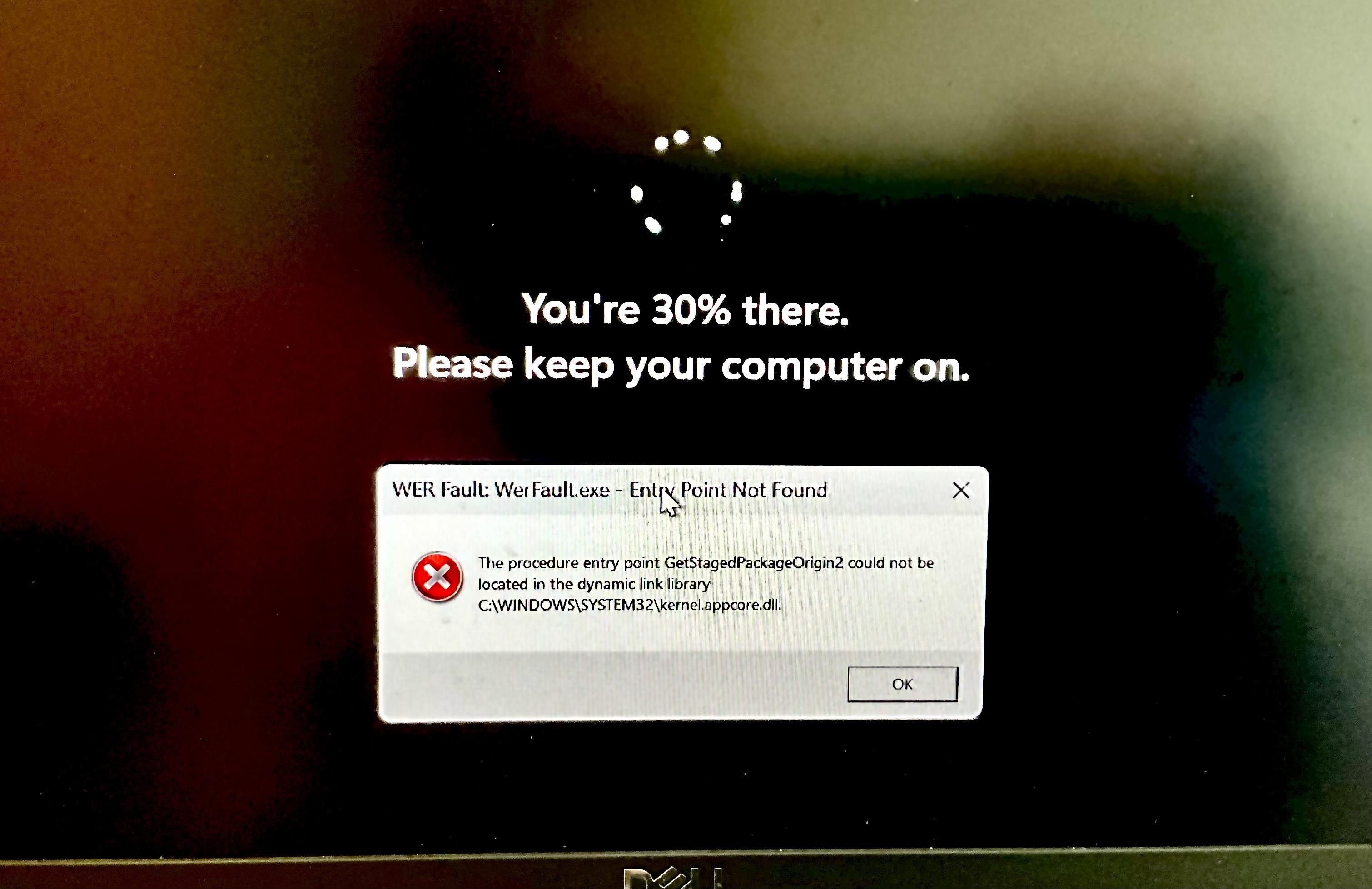
well this is the scariest thing my work computer has ever done.

Planlagt Fastgjort Låst Flyttet Ikke-kategoriseret
23 Indlæg 14 Posters 42 Visninger
  • Ældste til nyeste
  • Nyeste til ældste
  • Most Votes
Svar
  • Svar som emne
Login for at svare
Denne tråd er blevet slettet. Kun brugere med emne behandlings privilegier kan se den.
  • 0xabad1dea@infosec.exchange0 0xabad1dea@infosec.exchange

    well this is the scariest thing my work computer has ever done. I didn’t even know it was structurally possible for popup windows to appear over the Windows Update screen

    rairii@labyrinth.zoneR This user is from outside of this forum
    rairii@labyrinth.zoneR This user is from outside of this forum
    rairii@labyrinth.zone
    wrote sidst redigeret af
    #11
    @0xabad1dea that is NtRaiseHardError, and win32 is all up and running to display the login screen which displays that progress, i think the scariest thing about this is that it failed to launch werfault which means something crashed
    1 Reply Last reply
    0
    • 0xabad1dea@infosec.exchange0 0xabad1dea@infosec.exchange

      well this is the scariest thing my work computer has ever done. I didn’t even know it was structurally possible for popup windows to appear over the Windows Update screen

      0xabad1dea@infosec.exchange0 This user is from outside of this forum
      0xabad1dea@infosec.exchange0 This user is from outside of this forum
      0xabad1dea@infosec.exchange
      wrote sidst redigeret af
      #12

      to my genuine but relieved surprise, it still booted after this.

      what's truly mystifying, however, is how the Dell firmware manages to have two or three ⚠️Critical⚠️ bios updates a week. I understand neither where they're all coming from nor how Dell sustains such a rapid release cycle of high-risk firmware patches long-term.

      mav@masto.hackers.townM kabutor@infosec.exchangeK effika@mastodon.socialE me@mastodon.cysioland.plM iloo@mastodon.socialI 6 Replies Last reply
      0
      • 0xabad1dea@infosec.exchange0 0xabad1dea@infosec.exchange

        well this is the scariest thing my work computer has ever done. I didn’t even know it was structurally possible for popup windows to appear over the Windows Update screen

        privateger@plasmatrap.comP This user is from outside of this forum
        privateger@plasmatrap.comP This user is from outside of this forum
        privateger@plasmatrap.com
        wrote sidst redigeret af
        #13

        @0xabad1dea@infosec.exchange oh yeah Signal always pops up a window like this with a memory fault error when I power off my Windows install ​​

        1 Reply Last reply
        0
        • 0xabad1dea@infosec.exchange0 0xabad1dea@infosec.exchange

          to my genuine but relieved surprise, it still booted after this.

          what's truly mystifying, however, is how the Dell firmware manages to have two or three ⚠️Critical⚠️ bios updates a week. I understand neither where they're all coming from nor how Dell sustains such a rapid release cycle of high-risk firmware patches long-term.

          mav@masto.hackers.townM This user is from outside of this forum
          mav@masto.hackers.townM This user is from outside of this forum
          mav@masto.hackers.town
          wrote sidst redigeret af
          #14

          @0xabad1dea little to no testing would be my guess

          1 Reply Last reply
          0
          • 0xabad1dea@infosec.exchange0 0xabad1dea@infosec.exchange

            to my genuine but relieved surprise, it still booted after this.

            what's truly mystifying, however, is how the Dell firmware manages to have two or three ⚠️Critical⚠️ bios updates a week. I understand neither where they're all coming from nor how Dell sustains such a rapid release cycle of high-risk firmware patches long-term.

            kabutor@infosec.exchangeK This user is from outside of this forum
            kabutor@infosec.exchangeK This user is from outside of this forum
            kabutor@infosec.exchange
            wrote sidst redigeret af
            #15

            @0xabad1dea I have a Lenovo that did something like 7 bios updates in the same day, laptop was disconnected for a while, but instead of doing last one windows update makes it step each one at a time.

            Also if you had a critical error before it's a good idea to do a sfc /scannow I was sceptic before but that command fixs a lot of corrupted files all the time.

            1 Reply Last reply
            0
            • 0xabad1dea@infosec.exchange0 0xabad1dea@infosec.exchange

              @xaetacore oh I'm sure it's very simple for you to click the button after someone else put in all the work to be sure it will work, yes.

              xaetacore@neondystopia.worldX This user is from outside of this forum
              xaetacore@neondystopia.worldX This user is from outside of this forum
              xaetacore@neondystopia.world
              wrote sidst redigeret af
              #16
              @0xabad1dea@infosec.exchange I write and maintain gentoo ebuilds lol, i am very familiar with the process of writing ebuilds, RPMs, Debs and Pkgbuilds, as well as manual source compiles and installations
              xaetacore@neondystopia.worldX 1 Reply Last reply
              0
              • 0xabad1dea@infosec.exchange0 0xabad1dea@infosec.exchange

                to my genuine but relieved surprise, it still booted after this.

                what's truly mystifying, however, is how the Dell firmware manages to have two or three ⚠️Critical⚠️ bios updates a week. I understand neither where they're all coming from nor how Dell sustains such a rapid release cycle of high-risk firmware patches long-term.

                effika@mastodon.socialE This user is from outside of this forum
                effika@mastodon.socialE This user is from outside of this forum
                effika@mastodon.social
                wrote sidst redigeret af
                #17

                @0xabad1dea those firmware updates give me a great excuse to do nothing for several minutes while it updates & reboots, which perhaps the firmware writers also appreciate

                1 Reply Last reply
                0
                • xaetacore@neondystopia.worldX xaetacore@neondystopia.world
                  @0xabad1dea@infosec.exchange I write and maintain gentoo ebuilds lol, i am very familiar with the process of writing ebuilds, RPMs, Debs and Pkgbuilds, as well as manual source compiles and installations
                  xaetacore@neondystopia.worldX This user is from outside of this forum
                  xaetacore@neondystopia.worldX This user is from outside of this forum
                  xaetacore@neondystopia.world
                  wrote sidst redigeret af
                  #18
                  @0xabad1dea@infosec.exchange writing packages is different from installing them or updating them. The same goes for windows.
                  The process of installing or updating is exactly as I described on most distributions.
                  The way it is able to track the files.It installs is partially also because of the fake root it puts them in before merging it with the real root
                  1 Reply Last reply
                  0
                  • 0xabad1dea@infosec.exchange0 0xabad1dea@infosec.exchange

                    to my genuine but relieved surprise, it still booted after this.

                    what's truly mystifying, however, is how the Dell firmware manages to have two or three ⚠️Critical⚠️ bios updates a week. I understand neither where they're all coming from nor how Dell sustains such a rapid release cycle of high-risk firmware patches long-term.

                    me@mastodon.cysioland.plM This user is from outside of this forum
                    me@mastodon.cysioland.plM This user is from outside of this forum
                    me@mastodon.cysioland.pl
                    wrote sidst redigeret af
                    #19

                    @0xabad1dea yeah, now I remember that in Big Corporate we've had Dell firmware updates quite often (whitelabeled by the corporate though)

                    1 Reply Last reply
                    0
                    • 0xabad1dea@infosec.exchange0 0xabad1dea@infosec.exchange

                      to my genuine but relieved surprise, it still booted after this.

                      what's truly mystifying, however, is how the Dell firmware manages to have two or three ⚠️Critical⚠️ bios updates a week. I understand neither where they're all coming from nor how Dell sustains such a rapid release cycle of high-risk firmware patches long-term.

                      iloo@mastodon.socialI This user is from outside of this forum
                      iloo@mastodon.socialI This user is from outside of this forum
                      iloo@mastodon.social
                      wrote sidst redigeret af
                      #20

                      @0xabad1dea This is interesting, I use linux on my Dell, so does my better half and there's no firmware updates unless we say so ☺️

                      0xabad1dea@infosec.exchange0 1 Reply Last reply
                      0
                      • iloo@mastodon.socialI iloo@mastodon.social

                        @0xabad1dea This is interesting, I use linux on my Dell, so does my better half and there's no firmware updates unless we say so ☺️

                        0xabad1dea@infosec.exchange0 This user is from outside of this forum
                        0xabad1dea@infosec.exchange0 This user is from outside of this forum
                        0xabad1dea@infosec.exchange
                        wrote sidst redigeret af
                        #21

                        @Iloo I'm confused why you think that's different from Windows? the updates exist whether you choose to install them or not, in either case

                        iloo@mastodon.socialI 1 Reply Last reply
                        0
                        • 0xabad1dea@infosec.exchange0 0xabad1dea@infosec.exchange

                          to my genuine but relieved surprise, it still booted after this.

                          what's truly mystifying, however, is how the Dell firmware manages to have two or three ⚠️Critical⚠️ bios updates a week. I understand neither where they're all coming from nor how Dell sustains such a rapid release cycle of high-risk firmware patches long-term.

                          ember@radikal.socialE This user is from outside of this forum
                          ember@radikal.socialE This user is from outside of this forum
                          ember@radikal.social
                          wrote sidst redigeret af
                          #22

                          @0xabad1dea I imagine it's unsustainable

                          1 Reply Last reply
                          0
                          • 0xabad1dea@infosec.exchange0 0xabad1dea@infosec.exchange

                            @Iloo I'm confused why you think that's different from Windows? the updates exist whether you choose to install them or not, in either case

                            iloo@mastodon.socialI This user is from outside of this forum
                            iloo@mastodon.socialI This user is from outside of this forum
                            iloo@mastodon.social
                            wrote sidst redigeret af
                            #23

                            @0xabad1dea I don't get them automatically, if I want them I can do them as needed in the time that is convenient for me, which means I get to decided what my laptop is doing at any given time not the other way around ☺️

                            1 Reply Last reply
                            0
                            • jwcph@helvede.netJ jwcph@helvede.net shared this topic

                            Svar
                            • Svar som emne
                            Login for at svare
                            • Ældste til nyeste
                            • Nyeste til ældste
                            • Most Votes


                            • Log ind

                            • Har du ikke en konto? Tilmeld

                            • Login or register to search.
                            Powered by NodeBB Contributors
                            Graciously hosted by data.coop
                            • First post
                              Last post
                            0
                            • Hjem
                            • Seneste
                            • Etiketter
                            • Populære
                            • Verden
                            • Bruger
                            • Grupper