Skip to content
  • Hjem
  • Seneste
  • Etiketter
  • Populære
  • Verden
  • Bruger
  • Grupper
Temaer
  • Light
  • Brite
  • Cerulean
  • Cosmo
  • Flatly
  • Journal
  • Litera
  • Lumen
  • Lux
  • Materia
  • Minty
  • Morph
  • Pulse
  • Sandstone
  • Simplex
  • Sketchy
  • Spacelab
  • United
  • Yeti
  • Zephyr
  • Dark
  • Cyborg
  • Darkly
  • Quartz
  • Slate
  • Solar
  • Superhero
  • Vapor

  • Default (No Skin)
  • No Skin
Kollaps
FARVEL BIG TECH
  1. Forside
  2. Ikke-kategoriseret
  3. I'm on Linux.

I'm on Linux.

Planlagt Fastgjort Låst Flyttet Ikke-kategoriseret
31 Indlæg 23 Posters 0 Visninger
  • Ældste til nyeste
  • Nyeste til ældste
  • Most Votes
Svar
  • Svar som emne
Login for at svare
Denne tråd er blevet slettet. Kun brugere med emne behandlings privilegier kan se den.
  • mcc@mastodon.socialM This user is from outside of this forum
    mcc@mastodon.socialM This user is from outside of this forum
    mcc@mastodon.social
    wrote sidst redigeret af
    #1

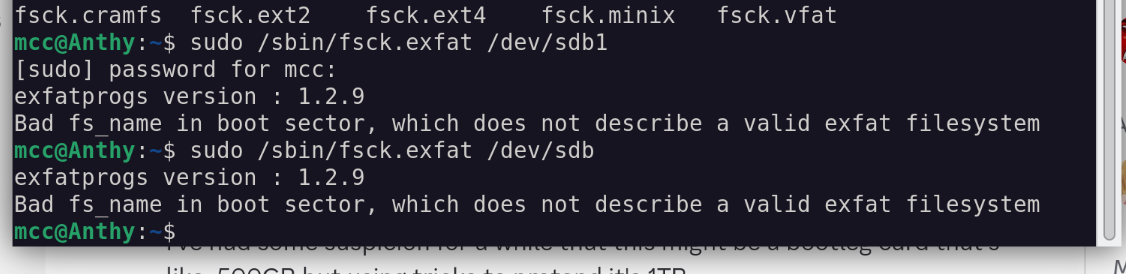
    I'm on Linux. I have an SD card which has been giving me a number of strange problems for a while now. It now appears to have wiped itself completely. Looking in GNOME disks the main partition, which I expect to be exfat, is of type "unknown". If I run fsck.exfat, It claims it's not a valid exfat image.

    Windows refuses to even look at it.

    Before I destructively image the disk, do you think there is ANYTHING else I can/should try to see if the data is still easily recoverable?

    ellenor2000@mastodon.topE allie@kind.socialA hyc@mastodon.socialH ? lluad@mastodon.ieL 19 Replies Last reply
    0
    • mcc@mastodon.socialM mcc@mastodon.social

      I'm on Linux. I have an SD card which has been giving me a number of strange problems for a while now. It now appears to have wiped itself completely. Looking in GNOME disks the main partition, which I expect to be exfat, is of type "unknown". If I run fsck.exfat, It claims it's not a valid exfat image.

      Windows refuses to even look at it.

      Before I destructively image the disk, do you think there is ANYTHING else I can/should try to see if the data is still easily recoverable?

      ellenor2000@mastodon.topE This user is from outside of this forum
      ellenor2000@mastodon.topE This user is from outside of this forum
      ellenor2000@mastodon.top
      wrote sidst redigeret af
      #2

      @mcc testdisk/photorec? last i remember ubuntu had testdisk or both in its repos #lang_en

      1 Reply Last reply
      0
      • mcc@mastodon.socialM mcc@mastodon.social

        I'm on Linux. I have an SD card which has been giving me a number of strange problems for a while now. It now appears to have wiped itself completely. Looking in GNOME disks the main partition, which I expect to be exfat, is of type "unknown". If I run fsck.exfat, It claims it's not a valid exfat image.

        Windows refuses to even look at it.

        Before I destructively image the disk, do you think there is ANYTHING else I can/should try to see if the data is still easily recoverable?

        allie@kind.socialA This user is from outside of this forum
        allie@kind.socialA This user is from outside of this forum
        allie@kind.social
        wrote sidst redigeret af
        #3

        @mcc Is there maybe a way to write a "valid boot sector" to it. I remember there being a utility for that, but I don't remember what it's called.

        Maybe dd-ing it to a file as a backup?

        1 Reply Last reply
        0
        • mcc@mastodon.socialM mcc@mastodon.social

          I'm on Linux. I have an SD card which has been giving me a number of strange problems for a while now. It now appears to have wiped itself completely. Looking in GNOME disks the main partition, which I expect to be exfat, is of type "unknown". If I run fsck.exfat, It claims it's not a valid exfat image.

          Windows refuses to even look at it.

          Before I destructively image the disk, do you think there is ANYTHING else I can/should try to see if the data is still easily recoverable?

          hyc@mastodon.socialH This user is from outside of this forum
          hyc@mastodon.socialH This user is from outside of this forum
          hyc@mastodon.social
          wrote sidst redigeret af
          #4

          @mcc dd the entire thing to a file, work with the file. There are two FATs on any fat filesystem, the 2nd one might still be intact.

          1 Reply Last reply
          0
          • mcc@mastodon.socialM mcc@mastodon.social

            I'm on Linux. I have an SD card which has been giving me a number of strange problems for a while now. It now appears to have wiped itself completely. Looking in GNOME disks the main partition, which I expect to be exfat, is of type "unknown". If I run fsck.exfat, It claims it's not a valid exfat image.

            Windows refuses to even look at it.

            Before I destructively image the disk, do you think there is ANYTHING else I can/should try to see if the data is still easily recoverable?

            ? Offline
            ? Offline
            Gæst
            wrote sidst redigeret af
            #5

            @mcc@mastodon.social i guess id try using photorec on it? and maybe save a full backup of the entire disk image with ddrescue if its particularly important to me (in this case id take the backup first before anything else)

            1 Reply Last reply
            0
            • mcc@mastodon.socialM mcc@mastodon.social

              I'm on Linux. I have an SD card which has been giving me a number of strange problems for a while now. It now appears to have wiped itself completely. Looking in GNOME disks the main partition, which I expect to be exfat, is of type "unknown". If I run fsck.exfat, It claims it's not a valid exfat image.

              Windows refuses to even look at it.

              Before I destructively image the disk, do you think there is ANYTHING else I can/should try to see if the data is still easily recoverable?

              lluad@mastodon.ieL This user is from outside of this forum
              lluad@mastodon.ieL This user is from outside of this forum
              lluad@mastodon.ie
              wrote sidst redigeret af
              #6

              @mcc Image the whole SD to a file, then take a copy of the file and work solely with the copy.

              ddrescue may be a good way to make that image, depending on how the SD card has failed.

              Then something like TestDisk might help recover files.

              pelle@veganism.socialP 1 Reply Last reply
              0
              • mcc@mastodon.socialM mcc@mastodon.social

                I'm on Linux. I have an SD card which has been giving me a number of strange problems for a while now. It now appears to have wiped itself completely. Looking in GNOME disks the main partition, which I expect to be exfat, is of type "unknown". If I run fsck.exfat, It claims it's not a valid exfat image.

                Windows refuses to even look at it.

                Before I destructively image the disk, do you think there is ANYTHING else I can/should try to see if the data is still easily recoverable?

                fuzzix@mastodon.ieF This user is from outside of this forum
                fuzzix@mastodon.ieF This user is from outside of this forum
                fuzzix@mastodon.ie
                wrote sidst redigeret af
                #7

                @mcc https://www.cgsecurity.org/wiki/TestDisk used this once to recover an ext4 partition *after* someone had reformatted it as NTFS... YMMV. Good luck!

                1 Reply Last reply
                0
                • mcc@mastodon.socialM mcc@mastodon.social

                  I'm on Linux. I have an SD card which has been giving me a number of strange problems for a while now. It now appears to have wiped itself completely. Looking in GNOME disks the main partition, which I expect to be exfat, is of type "unknown". If I run fsck.exfat, It claims it's not a valid exfat image.

                  Windows refuses to even look at it.

                  Before I destructively image the disk, do you think there is ANYTHING else I can/should try to see if the data is still easily recoverable?

                  jonfr600@mastodon.socialJ This user is from outside of this forum
                  jonfr600@mastodon.socialJ This user is from outside of this forum
                  jonfr600@mastodon.social
                  wrote sidst redigeret af
                  #8

                  @mcc This looks like a bad block in the sector of the SD card. It seems that it can only be repaired using Windows.

                  https://superuser.com/questions/519513/repairing-a-corrupt-exfat-file-system

                  1 Reply Last reply
                  0
                  • mcc@mastodon.socialM mcc@mastodon.social

                    I'm on Linux. I have an SD card which has been giving me a number of strange problems for a while now. It now appears to have wiped itself completely. Looking in GNOME disks the main partition, which I expect to be exfat, is of type "unknown". If I run fsck.exfat, It claims it's not a valid exfat image.

                    Windows refuses to even look at it.

                    Before I destructively image the disk, do you think there is ANYTHING else I can/should try to see if the data is still easily recoverable?

                    jpaskaruk@growers.socialJ This user is from outside of this forum
                    jpaskaruk@growers.socialJ This user is from outside of this forum
                    jpaskaruk@growers.social
                    wrote sidst redigeret af
                    #9

                    @mcc I accept the occasional death of an SD card to be the price of doing pleasure.

                    I also have a hoard of all my broken and way-too-tiny cards because of course I do.

                    Might be able to fix that worthless 64MB SD someday.

                    1 Reply Last reply
                    0
                    • mcc@mastodon.socialM mcc@mastodon.social

                      I'm on Linux. I have an SD card which has been giving me a number of strange problems for a while now. It now appears to have wiped itself completely. Looking in GNOME disks the main partition, which I expect to be exfat, is of type "unknown". If I run fsck.exfat, It claims it's not a valid exfat image.

                      Windows refuses to even look at it.

                      Before I destructively image the disk, do you think there is ANYTHING else I can/should try to see if the data is still easily recoverable?

                      nicolai@babka.socialN This user is from outside of this forum
                      nicolai@babka.socialN This user is from outside of this forum
                      nicolai@babka.social
                      wrote sidst redigeret af
                      #10

                      @mcc testdisk and photorec. And make a copy with GNU ddrescue before

                      1 Reply Last reply
                      0
                      • mcc@mastodon.socialM mcc@mastodon.social

                        I'm on Linux. I have an SD card which has been giving me a number of strange problems for a while now. It now appears to have wiped itself completely. Looking in GNOME disks the main partition, which I expect to be exfat, is of type "unknown". If I run fsck.exfat, It claims it's not a valid exfat image.

                        Windows refuses to even look at it.

                        Before I destructively image the disk, do you think there is ANYTHING else I can/should try to see if the data is still easily recoverable?

                        joriki@infosec.exchangeJ This user is from outside of this forum
                        joriki@infosec.exchangeJ This user is from outside of this forum
                        joriki@infosec.exchange
                        wrote sidst redigeret af
                        #11

                        @mcc

                        maybe possibly: bootrepair

                        1 Reply Last reply
                        0
                        • mcc@mastodon.socialM mcc@mastodon.social

                          I'm on Linux. I have an SD card which has been giving me a number of strange problems for a while now. It now appears to have wiped itself completely. Looking in GNOME disks the main partition, which I expect to be exfat, is of type "unknown". If I run fsck.exfat, It claims it's not a valid exfat image.

                          Windows refuses to even look at it.

                          Before I destructively image the disk, do you think there is ANYTHING else I can/should try to see if the data is still easily recoverable?

                          lynndotpy@mastodon.socialL This user is from outside of this forum
                          lynndotpy@mastodon.socialL This user is from outside of this forum
                          lynndotpy@mastodon.social
                          wrote sidst redigeret af
                          #12

                          @mcc Other advice to make a copy and then use testdisk / photorec are good. But if you haven't checked with a known good card already, maybe the reader / adapter could be an issue too?

                          1 Reply Last reply
                          0
                          • mcc@mastodon.socialM mcc@mastodon.social

                            I'm on Linux. I have an SD card which has been giving me a number of strange problems for a while now. It now appears to have wiped itself completely. Looking in GNOME disks the main partition, which I expect to be exfat, is of type "unknown". If I run fsck.exfat, It claims it's not a valid exfat image.

                            Windows refuses to even look at it.

                            Before I destructively image the disk, do you think there is ANYTHING else I can/should try to see if the data is still easily recoverable?

                            mhoye@cosocial.caM This user is from outside of this forum
                            mhoye@cosocial.caM This user is from outside of this forum
                            mhoye@cosocial.ca
                            wrote sidst redigeret af
                            #13

                            @mcc I see that other people have already mentioned them, but the right answer is testdisk/photorec and I've seen them save the day more than a few times.

                            https://www.cgsecurity.org/wiki/PhotoRec

                            1 Reply Last reply
                            0
                            • mcc@mastodon.socialM mcc@mastodon.social

                              I'm on Linux. I have an SD card which has been giving me a number of strange problems for a while now. It now appears to have wiped itself completely. Looking in GNOME disks the main partition, which I expect to be exfat, is of type "unknown". If I run fsck.exfat, It claims it's not a valid exfat image.

                              Windows refuses to even look at it.

                              Before I destructively image the disk, do you think there is ANYTHING else I can/should try to see if the data is still easily recoverable?

                              realcainmosni@mastodon.me.ukR This user is from outside of this forum
                              realcainmosni@mastodon.me.ukR This user is from outside of this forum
                              realcainmosni@mastodon.me.uk
                              wrote sidst redigeret af
                              #14

                              @mcc Best you can do is image the device - if it is readable at all - and work with that. Do NOT try to work with the device directly if you can avoid it. Corruption lies in that direction. From now on treat it as read only (which also means not attempting to mount it, again).

                              realcainmosni@mastodon.me.ukR 1 Reply Last reply
                              0
                              • realcainmosni@mastodon.me.ukR realcainmosni@mastodon.me.uk

                                @mcc Best you can do is image the device - if it is readable at all - and work with that. Do NOT try to work with the device directly if you can avoid it. Corruption lies in that direction. From now on treat it as read only (which also means not attempting to mount it, again).

                                realcainmosni@mastodon.me.ukR This user is from outside of this forum
                                realcainmosni@mastodon.me.ukR This user is from outside of this forum
                                realcainmosni@mastodon.me.uk
                                wrote sidst redigeret af
                                #15

                                @mcc There are forensic tools which will help make sense of the image if you can get one at all. Binwalk on the image, for starters. A bit overblown for your use case, but there's also Sleuthkit and Autopsy (proper forensic tools, which are great for data recovery, if you have the time and dedication).

                                1 Reply Last reply
                                0
                                • mcc@mastodon.socialM mcc@mastodon.social

                                  I'm on Linux. I have an SD card which has been giving me a number of strange problems for a while now. It now appears to have wiped itself completely. Looking in GNOME disks the main partition, which I expect to be exfat, is of type "unknown". If I run fsck.exfat, It claims it's not a valid exfat image.

                                  Windows refuses to even look at it.

                                  Before I destructively image the disk, do you think there is ANYTHING else I can/should try to see if the data is still easily recoverable?

                                  simon@gotosocial.grnwds.ukS This user is from outside of this forum
                                  simon@gotosocial.grnwds.ukS This user is from outside of this forum
                                  simon@gotosocial.grnwds.uk
                                  wrote sidst redigeret af
                                  #16

                                  @mcc
                                  TestDisk might work but haven't tried it with exfat. It's very good for Linux filesystems. https://www.cgsecurity.org/wiki/TestDisk_Download

                                  1 Reply Last reply
                                  0
                                  • mcc@mastodon.socialM mcc@mastodon.social

                                    I'm on Linux. I have an SD card which has been giving me a number of strange problems for a while now. It now appears to have wiped itself completely. Looking in GNOME disks the main partition, which I expect to be exfat, is of type "unknown". If I run fsck.exfat, It claims it's not a valid exfat image.

                                    Windows refuses to even look at it.

                                    Before I destructively image the disk, do you think there is ANYTHING else I can/should try to see if the data is still easily recoverable?

                                    davep@infosec.exchangeD This user is from outside of this forum
                                    davep@infosec.exchangeD This user is from outside of this forum
                                    davep@infosec.exchange
                                    wrote sidst redigeret af
                                    #17

                                    @mcc This sort of thing but without the live Linux USB?

                                    https://www.thelinuxvault.net/linux-backup-recovery/step-by-step-linux-data-recovery-tutorial/

                                    davep@infosec.exchangeD 1 Reply Last reply
                                    0
                                    • davep@infosec.exchangeD davep@infosec.exchange

                                      @mcc This sort of thing but without the live Linux USB?

                                      https://www.thelinuxvault.net/linux-backup-recovery/step-by-step-linux-data-recovery-tutorial/

                                      davep@infosec.exchangeD This user is from outside of this forum
                                      davep@infosec.exchangeD This user is from outside of this forum
                                      davep@infosec.exchange
                                      wrote sidst redigeret af
                                      #18

                                      @mcc I'd go down straight to the "make an image" bit first.

                                      1 Reply Last reply
                                      0
                                      • mcc@mastodon.socialM mcc@mastodon.social

                                        I'm on Linux. I have an SD card which has been giving me a number of strange problems for a while now. It now appears to have wiped itself completely. Looking in GNOME disks the main partition, which I expect to be exfat, is of type "unknown". If I run fsck.exfat, It claims it's not a valid exfat image.

                                        Windows refuses to even look at it.

                                        Before I destructively image the disk, do you think there is ANYTHING else I can/should try to see if the data is still easily recoverable?

                                        S This user is from outside of this forum
                                        S This user is from outside of this forum
                                        spacelifeform@infosec.exchange
                                        wrote sidst redigeret af
                                        #19

                                        @mcc

                                        Probably tosst. What does fdisk -l /dev/sda report?

                                        mcc@mastodon.socialM 1 Reply Last reply
                                        0
                                        • mcc@mastodon.socialM mcc@mastodon.social

                                          I'm on Linux. I have an SD card which has been giving me a number of strange problems for a while now. It now appears to have wiped itself completely. Looking in GNOME disks the main partition, which I expect to be exfat, is of type "unknown". If I run fsck.exfat, It claims it's not a valid exfat image.

                                          Windows refuses to even look at it.

                                          Before I destructively image the disk, do you think there is ANYTHING else I can/should try to see if the data is still easily recoverable?

                                          evan@cosocial.caE This user is from outside of this forum
                                          evan@cosocial.caE This user is from outside of this forum
                                          evan@cosocial.ca
                                          wrote sidst redigeret af
                                          #20

                                          @mcc I've had good results with ddrescue and external drives.

                                          https://www.gnu.org/software/ddrescue/

                                          jamesd@mastodon.socialJ 1 Reply Last reply
                                          0
                                          Svar
                                          • Svar som emne
                                          Login for at svare
                                          • Ældste til nyeste
                                          • Nyeste til ældste
                                          • Most Votes


                                          • Log ind

                                          • Har du ikke en konto? Tilmeld

                                          • Login or register to search.
                                          Powered by NodeBB Contributors
                                          Graciously hosted by data.coop
                                          • First post
                                            Last post
                                          0
                                          • Hjem
                                          • Seneste
                                          • Etiketter
                                          • Populære
                                          • Verden
                                          • Bruger
                                          • Grupper