Skip to content
  • Hjem
  • Seneste
  • Etiketter
  • Populære
  • Verden
  • Bruger
  • Grupper
Temaer
  • Light
  • Brite
  • Cerulean
  • Cosmo
  • Flatly
  • Journal
  • Litera
  • Lumen
  • Lux
  • Materia
  • Minty
  • Morph
  • Pulse
  • Sandstone
  • Simplex
  • Sketchy
  • Spacelab
  • United
  • Yeti
  • Zephyr
  • Dark
  • Cyborg
  • Darkly
  • Quartz
  • Slate
  • Solar
  • Superhero
  • Vapor

  • Default (No Skin)
  • No Skin
Kollaps
FARVEL BIG TECH
  1. Forside
  2. Ikke-kategoriseret
  3. The actual ‘video ID’ is the random string after:
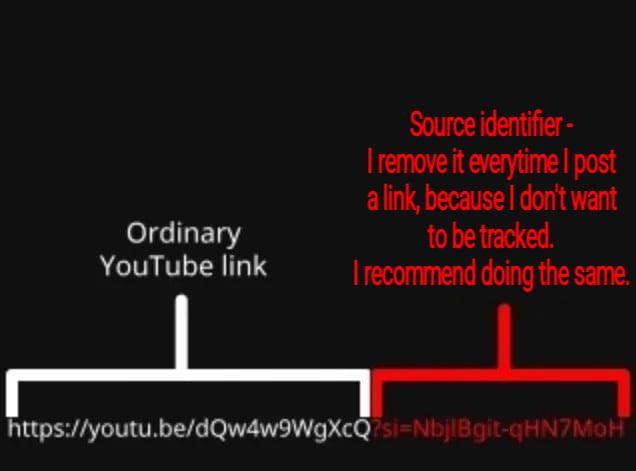
The actual ‘video ID’ is the random string after:

Planlagt Fastgjort Låst Flyttet Ikke-kategoriseret
youtube
36 Indlæg 28 Posters 1 Visninger
  • Ældste til nyeste
  • Nyeste til ældste
  • Most Votes
Svar
  • Svar som emne
Login for at svare
Denne tråd er blevet slettet. Kun brugere med emne behandlings privilegier kan se den.
  • stux@mstdn.socialS stux@mstdn.social

    The actual ‘video ID’ is the random string after:

    youtube.com/watch?v=

    If there is a “&” or “?” with another random string that is the tracker

    You can delete everything after the after the first random string starting with the “&”

    Or don’t use #YouTube!

    qccechris@mastodon.socialQ This user is from outside of this forum
    qccechris@mastodon.socialQ This user is from outside of this forum
    qccechris@mastodon.social
    wrote sidst redigeret af
    #6

    @stux
    I tell my friends all the time. But, apparently, its so hard, so inconvenient. They even share Facebook and other meta product trackers the same way. Neoliberalism is good and right, and best for society. We should accept our corporate overlords.

    1 Reply Last reply
    0
    • stux@mstdn.socialS stux@mstdn.social

      The actual ‘video ID’ is the random string after:

      youtube.com/watch?v=

      If there is a “&” or “?” with another random string that is the tracker

      You can delete everything after the after the first random string starting with the “&”

      Or don’t use #YouTube!

      iamdannyboling@mstdn.socialI This user is from outside of this forum
      iamdannyboling@mstdn.socialI This user is from outside of this forum
      iamdannyboling@mstdn.social
      wrote sidst redigeret af
      #7

      @stux

      I got my husband trained to do this for *all* links, and if you knew my husband, you'd understand what an accomplishment that was lol.

      stux@mstdn.socialS 1 Reply Last reply
      0
      • iamdannyboling@mstdn.socialI iamdannyboling@mstdn.social

        @stux

        I got my husband trained to do this for *all* links, and if you knew my husband, you'd understand what an accomplishment that was lol.

        stux@mstdn.socialS This user is from outside of this forum
        stux@mstdn.socialS This user is from outside of this forum
        stux@mstdn.social
        wrote sidst redigeret af
        #8

        @IAmDannyBoling

        1 Reply Last reply
        0
        • theorangetheme@en.osm.townT theorangetheme@en.osm.town

          @stux I wrote an iOS shortcut to strip out the spyware from YouTube links, and it works super well!

          drunkeskimo@mastodon.socialD This user is from outside of this forum
          drunkeskimo@mastodon.socialD This user is from outside of this forum
          drunkeskimo@mastodon.social
          wrote sidst redigeret af
          #9

          @theorangetheme @stux

          How do you do that shortcut? I’ve been manually deleting the share identity from all my links for ages, and it’s kinda a pain in the ass on iOS

          theorangetheme@en.osm.townT 1 Reply Last reply
          0
          • stux@mstdn.socialS stux@mstdn.social

            The actual ‘video ID’ is the random string after:

            youtube.com/watch?v=

            If there is a “&” or “?” with another random string that is the tracker

            You can delete everything after the after the first random string starting with the “&”

            Or don’t use #YouTube!

            tekchip@infosec.exchangeT This user is from outside of this forum
            tekchip@infosec.exchangeT This user is from outside of this forum
            tekchip@infosec.exchange
            wrote sidst redigeret af
            #10

            @stux there are a ton of browser plugins that can do that for you. I've used this one before https://github.com/ClearURLs/Addon

            Granted that doesn't help on mobile so much.

            liquidlamp@hachyderm.ioL 1 Reply Last reply
            0
            • drunkeskimo@mastodon.socialD drunkeskimo@mastodon.social

              @theorangetheme @stux

              How do you do that shortcut? I’ve been manually deleting the share identity from all my links for ages, and it’s kinda a pain in the ass on iOS

              theorangetheme@en.osm.townT This user is from outside of this forum
              theorangetheme@en.osm.townT This user is from outside of this forum
              theorangetheme@en.osm.town
              wrote sidst redigeret af
              #11

              @drunkeskimo @stux You'll want to go into "Shortcuts", hit the large "+" (if on iOS 27), then it'll ask you to do AI nonsense so hit "Edit" in the upper right instead, and then you can add the various commands in order. If you search for things like "clipboard", "replace", and "copy", you should be able to find them. I can take screenshots of the individual steps, too. Actually, I might be able to just share the shortcut itself.

              1 Reply Last reply
              0
              • stux@mstdn.socialS stux@mstdn.social

                The actual ‘video ID’ is the random string after:

                youtube.com/watch?v=

                If there is a “&” or “?” with another random string that is the tracker

                You can delete everything after the after the first random string starting with the “&”

                Or don’t use #YouTube!

                muddle@infosec.exchangeM This user is from outside of this forum
                muddle@infosec.exchangeM This user is from outside of this forum
                muddle@infosec.exchange
                wrote sidst redigeret af
                #12

                @stux Yeah, everyone should know about si=.

                If you do use youtube (I'm guilty of sharing links), you might want to know the t= parameter, which seeks to time t in seconds. So, yeah, v and sometimes t are all you need.

                1 Reply Last reply
                0
                • stux@mstdn.socialS stux@mstdn.social

                  The actual ‘video ID’ is the random string after:

                  youtube.com/watch?v=

                  If there is a “&” or “?” with another random string that is the tracker

                  You can delete everything after the after the first random string starting with the “&”

                  Or don’t use #YouTube!

                  disorderlyf@todon.euD This user is from outside of this forum
                  disorderlyf@todon.euD This user is from outside of this forum
                  disorderlyf@todon.eu
                  wrote sidst redigeret af
                  #13

                  @stux Also applies to Amazon links for anything after "/dp/[random string]"

                  1 Reply Last reply
                  0
                  • stux@mstdn.socialS stux@mstdn.social

                    The actual ‘video ID’ is the random string after:

                    youtube.com/watch?v=

                    If there is a “&” or “?” with another random string that is the tracker

                    You can delete everything after the after the first random string starting with the “&”

                    Or don’t use #YouTube!

                    evelynoctavia@c.imE This user is from outside of this forum
                    evelynoctavia@c.imE This user is from outside of this forum
                    evelynoctavia@c.im
                    wrote sidst redigeret af
                    #14

                    @stux but every single content creator is on youtube? /s, ig

                    1 Reply Last reply
                    0
                    • stux@mstdn.socialS stux@mstdn.social

                      The actual ‘video ID’ is the random string after:

                      youtube.com/watch?v=

                      If there is a “&” or “?” with another random string that is the tracker

                      You can delete everything after the after the first random string starting with the “&”

                      Or don’t use #YouTube!

                      anguadelphine@mk.absturztau.beA This user is from outside of this forum
                      anguadelphine@mk.absturztau.beA This user is from outside of this forum
                      anguadelphine@mk.absturztau.be
                      wrote sidst redigeret af
                      #15

                      @stux@mstdn.social

                      Yeah I don't use it. It keeps demanding I sign in to watch anything.
                      Sooo I don't share links.
                      Vivaldi can usually cut the tracking stuff for other sites, but I try to be careful.
                      Funny how copying original links to Fediposts doesn't come with this problem; by design.

                      1 Reply Last reply
                      0
                      • stux@mstdn.socialS stux@mstdn.social

                        The actual ‘video ID’ is the random string after:

                        youtube.com/watch?v=

                        If there is a “&” or “?” with another random string that is the tracker

                        You can delete everything after the after the first random string starting with the “&”

                        Or don’t use #YouTube!

                        unboundcelestial@mastodon.socialU This user is from outside of this forum
                        unboundcelestial@mastodon.socialU This user is from outside of this forum
                        unboundcelestial@mastodon.social
                        wrote sidst redigeret af
                        #16

                        @stux I prefer this version.

                        1 Reply Last reply
                        0
                        • stux@mstdn.socialS stux@mstdn.social

                          The actual ‘video ID’ is the random string after:

                          youtube.com/watch?v=

                          If there is a “&” or “?” with another random string that is the tracker

                          You can delete everything after the after the first random string starting with the “&”

                          Or don’t use #YouTube!

                          csara@hachyderm.ioC This user is from outside of this forum
                          csara@hachyderm.ioC This user is from outside of this forum
                          csara@hachyderm.io
                          wrote sidst redigeret af
                          #17

                          @stux And here is an iphone shortcut I made that strips these URL queries from a string in your clipboard and adds the clean URL to your clipboard.

                          I keep the shortcut on my home screen and click it before sending links. Lots of sites include user ID for shareable links.

                          https://www.icloud.com/shortcuts/ae4f884d93a44906ad14c078cbf97542

                          1 Reply Last reply
                          0
                          • stux@mstdn.socialS stux@mstdn.social

                            The actual ‘video ID’ is the random string after:

                            youtube.com/watch?v=

                            If there is a “&” or “?” with another random string that is the tracker

                            You can delete everything after the after the first random string starting with the “&”

                            Or don’t use #YouTube!

                            ghostonthehalfshell@masto.aiG This user is from outside of this forum
                            ghostonthehalfshell@masto.aiG This user is from outside of this forum
                            ghostonthehalfshell@masto.ai
                            wrote sidst redigeret af
                            #18

                            @stux

                            I have been absolutely religious stripping off any tracking tags on YouTube links.

                            I stripped those sorts of things off of regular Web URL because they come loaded with them as well.

                            To hell with it all

                            1 Reply Last reply
                            0
                            • ghostonthehalfshell@masto.aiG This user is from outside of this forum
                              ghostonthehalfshell@masto.aiG This user is from outside of this forum
                              ghostonthehalfshell@masto.ai
                              wrote sidst redigeret af
                              #19

                              @ecoscore @stux

                              Same here. I used to use the share button and then manually prune off the tracking tag. But then YouTube has been screwing around with the inner of its Web interface, so I just go back to the address bar and copy off the relevant part

                              1 Reply Last reply
                              0
                              • stux@mstdn.socialS stux@mstdn.social

                                The actual ‘video ID’ is the random string after:

                                youtube.com/watch?v=

                                If there is a “&” or “?” with another random string that is the tracker

                                You can delete everything after the after the first random string starting with the “&”

                                Or don’t use #YouTube!

                                ned@beige.partyN This user is from outside of this forum
                                ned@beige.partyN This user is from outside of this forum
                                ned@beige.party
                                wrote sidst redigeret af
                                #20

                                @stux I do the same.

                                1 Reply Last reply
                                0
                                • stux@mstdn.socialS stux@mstdn.social

                                  The actual ‘video ID’ is the random string after:

                                  youtube.com/watch?v=

                                  If there is a “&” or “?” with another random string that is the tracker

                                  You can delete everything after the after the first random string starting with the “&”

                                  Or don’t use #YouTube!

                                  independentpen@mas.toI This user is from outside of this forum
                                  independentpen@mas.toI This user is from outside of this forum
                                  independentpen@mas.to
                                  wrote sidst redigeret af
                                  #21

                                  @stux I routinely remove it too and it's funny, I didn't know it was a tracker, I just thought it was messy unnecessary junk and I didn't trust it. Which, I mean, yeah

                                  1 Reply Last reply
                                  0
                                  • stux@mstdn.socialS stux@mstdn.social

                                    The actual ‘video ID’ is the random string after:

                                    youtube.com/watch?v=

                                    If there is a “&” or “?” with another random string that is the tracker

                                    You can delete everything after the after the first random string starting with the “&”

                                    Or don’t use #YouTube!

                                    nemo@mas.toN This user is from outside of this forum
                                    nemo@mas.toN This user is from outside of this forum
                                    nemo@mas.to
                                    wrote sidst redigeret af
                                    #22

                                    @stux People dont listen Stux I told them a bazillion times I also shared 4 to 5 cross platform & cross browser, ways to tell them and yet still I see them sharing the tracking URLs.

                                    1 Reply Last reply
                                    0
                                    • tekchip@infosec.exchangeT tekchip@infosec.exchange

                                      @stux there are a ton of browser plugins that can do that for you. I've used this one before https://github.com/ClearURLs/Addon

                                      Granted that doesn't help on mobile so much.

                                      liquidlamp@hachyderm.ioL This user is from outside of this forum
                                      liquidlamp@hachyderm.ioL This user is from outside of this forum
                                      liquidlamp@hachyderm.io
                                      wrote sidst redigeret af
                                      #23

                                      @Tekchip @stux you can install the above in the mobile version of Firefox/waterfox.

                                      To ensure its used for YouTube on mobile, you need to disable the YouTube app on android. They dont allow you to uninstall it without root, but it will stay disabled. Any YouTube links will then open in your browser instead.

                                      This has the added benefit of letting you use extensions like ublock origin and unhook to de-enshitify YouTube on mobile too boot.

                                      brudnowpis@mastodon.com.plB 1 Reply Last reply
                                      0
                                      • stux@mstdn.socialS stux@mstdn.social

                                        The actual ‘video ID’ is the random string after:

                                        youtube.com/watch?v=

                                        If there is a “&” or “?” with another random string that is the tracker

                                        You can delete everything after the after the first random string starting with the “&”

                                        Or don’t use #YouTube!

                                        gam3@okla.socialG This user is from outside of this forum
                                        gam3@okla.socialG This user is from outside of this forum
                                        gam3@okla.social
                                        wrote sidst redigeret af
                                        #24

                                        @stux Or you can use https://invidious.nerdvpn.de/watch?v=42iVcEg5SOM

                                        1 Reply Last reply
                                        0
                                        • stux@mstdn.socialS stux@mstdn.social

                                          The actual ‘video ID’ is the random string after:

                                          youtube.com/watch?v=

                                          If there is a “&” or “?” with another random string that is the tracker

                                          You can delete everything after the after the first random string starting with the “&”

                                          Or don’t use #YouTube!

                                          edgeofeurope@mastodon.socialE This user is from outside of this forum
                                          edgeofeurope@mastodon.socialE This user is from outside of this forum
                                          edgeofeurope@mastodon.social
                                          wrote sidst redigeret af
                                          #25

                                          @stux hidden rickroll spotted👀

                                          1 Reply Last reply
                                          0
                                          Svar
                                          • Svar som emne
                                          Login for at svare
                                          • Ældste til nyeste
                                          • Nyeste til ældste
                                          • Most Votes


                                          • Log ind

                                          • Login or register to search.
                                          Powered by NodeBB Contributors
                                          Graciously hosted by data.coop
                                          • First post
                                            Last post
                                          0
                                          • Hjem
                                          • Seneste
                                          • Etiketter
                                          • Populære
                                          • Verden
                                          • Bruger
                                          • Grupper