The actual ‘video ID’ is the random string after:
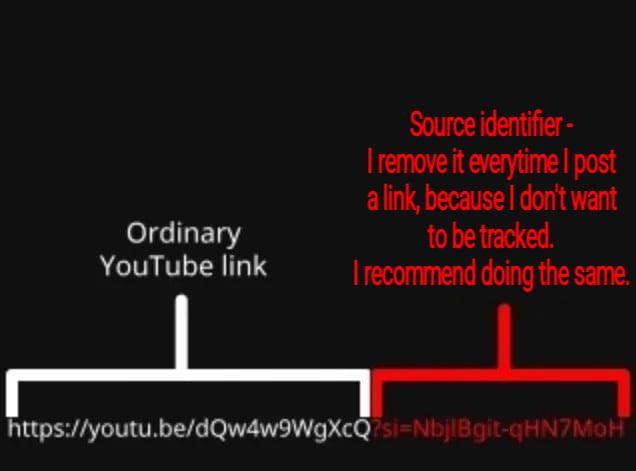
-
The actual ‘video ID’ is the random string after:
youtube.com/watch?v=
If there is a “&” or “?” with another random string that is the tracker
You can delete everything after the after the first random string starting with the “&”
Or don’t use #YouTube!
-
The actual ‘video ID’ is the random string after:
youtube.com/watch?v=
If there is a “&” or “?” with another random string that is the tracker
You can delete everything after the after the first random string starting with the “&”
Or don’t use #YouTube!
@stux I wrote an iOS shortcut to strip out the spyware from YouTube links, and it works super well!
-
@stux I wrote an iOS shortcut to strip out the spyware from YouTube links, and it works super well!
@stux Also, not sure if they did it for everyone, but recently, they turned on a feature that will tell the receiving party what your account name is, which sucks ass. You have to turn that off, too. There is a setting for it.
-
The actual ‘video ID’ is the random string after:
youtube.com/watch?v=
If there is a “&” or “?” with another random string that is the tracker
You can delete everything after the after the first random string starting with the “&”
Or don’t use #YouTube!
@stux This also applies to most online shopping store links as well.
-
The actual ‘video ID’ is the random string after:
youtube.com/watch?v=
If there is a “&” or “?” with another random string that is the tracker
You can delete everything after the after the first random string starting with the “&”
Or don’t use #YouTube!
@stux It's annoying how they put it everywhere, I need to delete it by hand everytime I share a youtube video >.<
-
The actual ‘video ID’ is the random string after:
youtube.com/watch?v=
If there is a “&” or “?” with another random string that is the tracker
You can delete everything after the after the first random string starting with the “&”
Or don’t use #YouTube!
@stux
I tell my friends all the time. But, apparently, its so hard, so inconvenient. They even share Facebook and other meta product trackers the same way. Neoliberalism is good and right, and best for society. We should accept our corporate overlords. -
The actual ‘video ID’ is the random string after:
youtube.com/watch?v=
If there is a “&” or “?” with another random string that is the tracker
You can delete everything after the after the first random string starting with the “&”
Or don’t use #YouTube!
I got my husband trained to do this for *all* links, and if you knew my husband, you'd understand what an accomplishment that was lol.
-
I got my husband trained to do this for *all* links, and if you knew my husband, you'd understand what an accomplishment that was lol.
-
@stux I wrote an iOS shortcut to strip out the spyware from YouTube links, and it works super well!
How do you do that shortcut? I’ve been manually deleting the share identity from all my links for ages, and it’s kinda a pain in the ass on iOS
-
The actual ‘video ID’ is the random string after:
youtube.com/watch?v=
If there is a “&” or “?” with another random string that is the tracker
You can delete everything after the after the first random string starting with the “&”
Or don’t use #YouTube!
@stux there are a ton of browser plugins that can do that for you. I've used this one before https://github.com/ClearURLs/Addon
Granted that doesn't help on mobile so much.
-
How do you do that shortcut? I’ve been manually deleting the share identity from all my links for ages, and it’s kinda a pain in the ass on iOS
@drunkeskimo @stux You'll want to go into "Shortcuts", hit the large "+" (if on iOS 27), then it'll ask you to do AI nonsense so hit "Edit" in the upper right instead, and then you can add the various commands in order. If you search for things like "clipboard", "replace", and "copy", you should be able to find them. I can take screenshots of the individual steps, too. Actually, I might be able to just share the shortcut itself.
-
The actual ‘video ID’ is the random string after:
youtube.com/watch?v=
If there is a “&” or “?” with another random string that is the tracker
You can delete everything after the after the first random string starting with the “&”
Or don’t use #YouTube!
@stux Yeah, everyone should know about si=.
If you do use youtube (I'm guilty of sharing links), you might want to know the t= parameter, which seeks to time t in seconds. So, yeah, v and sometimes t are all you need.
-
The actual ‘video ID’ is the random string after:
youtube.com/watch?v=
If there is a “&” or “?” with another random string that is the tracker
You can delete everything after the after the first random string starting with the “&”
Or don’t use #YouTube!
@stux Also applies to Amazon links for anything after "/dp/[random string]"
-
The actual ‘video ID’ is the random string after:
youtube.com/watch?v=
If there is a “&” or “?” with another random string that is the tracker
You can delete everything after the after the first random string starting with the “&”
Or don’t use #YouTube!
@stux but every single content creator is on youtube? /s, ig
-
The actual ‘video ID’ is the random string after:
youtube.com/watch?v=
If there is a “&” or “?” with another random string that is the tracker
You can delete everything after the after the first random string starting with the “&”
Or don’t use #YouTube!
@stux@mstdn.social
Yeah I don't use it. It keeps demanding I sign in to watch anything.
Sooo I don't share links.
Vivaldi can usually cut the tracking stuff for other sites, but I try to be careful.
Funny how copying original links to Fediposts doesn't come with this problem; by design. -
The actual ‘video ID’ is the random string after:
youtube.com/watch?v=
If there is a “&” or “?” with another random string that is the tracker
You can delete everything after the after the first random string starting with the “&”
Or don’t use #YouTube!
@stux I prefer this version.
-
The actual ‘video ID’ is the random string after:
youtube.com/watch?v=
If there is a “&” or “?” with another random string that is the tracker
You can delete everything after the after the first random string starting with the “&”
Or don’t use #YouTube!
@stux And here is an iphone shortcut I made that strips these URL queries from a string in your clipboard and adds the clean URL to your clipboard.
I keep the shortcut on my home screen and click it before sending links. Lots of sites include user ID for shareable links.
https://www.icloud.com/shortcuts/ae4f884d93a44906ad14c078cbf97542
-
The actual ‘video ID’ is the random string after:
youtube.com/watch?v=
If there is a “&” or “?” with another random string that is the tracker
You can delete everything after the after the first random string starting with the “&”
Or don’t use #YouTube!
I have been absolutely religious stripping off any tracking tags on YouTube links.
I stripped those sorts of things off of regular Web URL because they come loaded with them as well.
To hell with it all
-
-
The actual ‘video ID’ is the random string after:
youtube.com/watch?v=
If there is a “&” or “?” with another random string that is the tracker
You can delete everything after the after the first random string starting with the “&”
Or don’t use #YouTube!
@stux I do the same.