Skip to content
  • Hjem
  • Seneste
  • Etiketter
  • Populære
  • Verden
  • Bruger
  • Grupper
Temaer
  • Light
  • Cerulean
  • Cosmo
  • Flatly
  • Journal
  • Litera
  • Lumen
  • Lux
  • Materia
  • Minty
  • Morph
  • Pulse
  • Sandstone
  • Simplex
  • Sketchy
  • Spacelab
  • United
  • Yeti
  • Zephyr
  • Dark
  • Cyborg
  • Darkly
  • Quartz
  • Slate
  • Solar
  • Superhero
  • Vapor

  • Default (No Skin)
  • No Skin
Kollaps
FARVEL BIG TECH
  1. Forside
  2. Ikke-kategoriseret
  3. Had several questions about how the main "Home" feed works on Mastodon.

Had several questions about how the main "Home" feed works on Mastodon.

Planlagt Fastgjort Låst Flyttet Ikke-kategoriseret
feditipsmastodon
47 Indlæg 17 Posters 0 Visninger
  • Ældste til nyeste
  • Nyeste til ældste
  • Most Votes
Svar
  • Svar som emne
Login for at svare
Denne tråd er blevet slettet. Kun brugere med emne behandlings privilegier kan se den.
  • johan@tilde.zoneJ johan@tilde.zone

    @CuriousMagpie @FediTips

    No, unfortunately you cannot add hashtag follows to the list.

    feditips@social.growyourown.servicesF This user is from outside of this forum
    feditips@social.growyourown.servicesF This user is from outside of this forum
    feditips@social.growyourown.services
    wrote sidst redigeret af
    #15

    @johan @CuriousMagpie

    Johan's right, you unfortunately can't add tags to a list. This is one of the most requested features so the developers know there is demand for it.

    If you're comfortable using Github you can give it a thumbs up at https://github.com/mastodon/mastodon/issues/7692

    red_shirt_no2@c.imR 1 Reply Last reply
    0
    • feditips@social.growyourown.servicesF feditips@social.growyourown.services

      Had several questions about how the main "Home" feed works on Mastodon. Here's what it shows:

      1. All posts from all accounts you follow in chronological order, newest at top
      2. All posts shared by accounts or groups you follow
      3. Posts that use hashtags you follow in chronological order, newest at top

      ...and that's it, there's nothing else on your Home feed. It doesn't push anything else at you, it doesn't hide anything from you unless you ask it to. No algorithms, no ads.

      #FediTips #Mastodon

      S This user is from outside of this forum
      S This user is from outside of this forum
      spacelifeform@infosec.exchange
      wrote sidst redigeret af
      #16

      @FediTips

      And boosts unless you hide them.

      1 Reply Last reply
      0
      • feditips@social.growyourown.servicesF feditips@social.growyourown.services

        @johan @aspragg

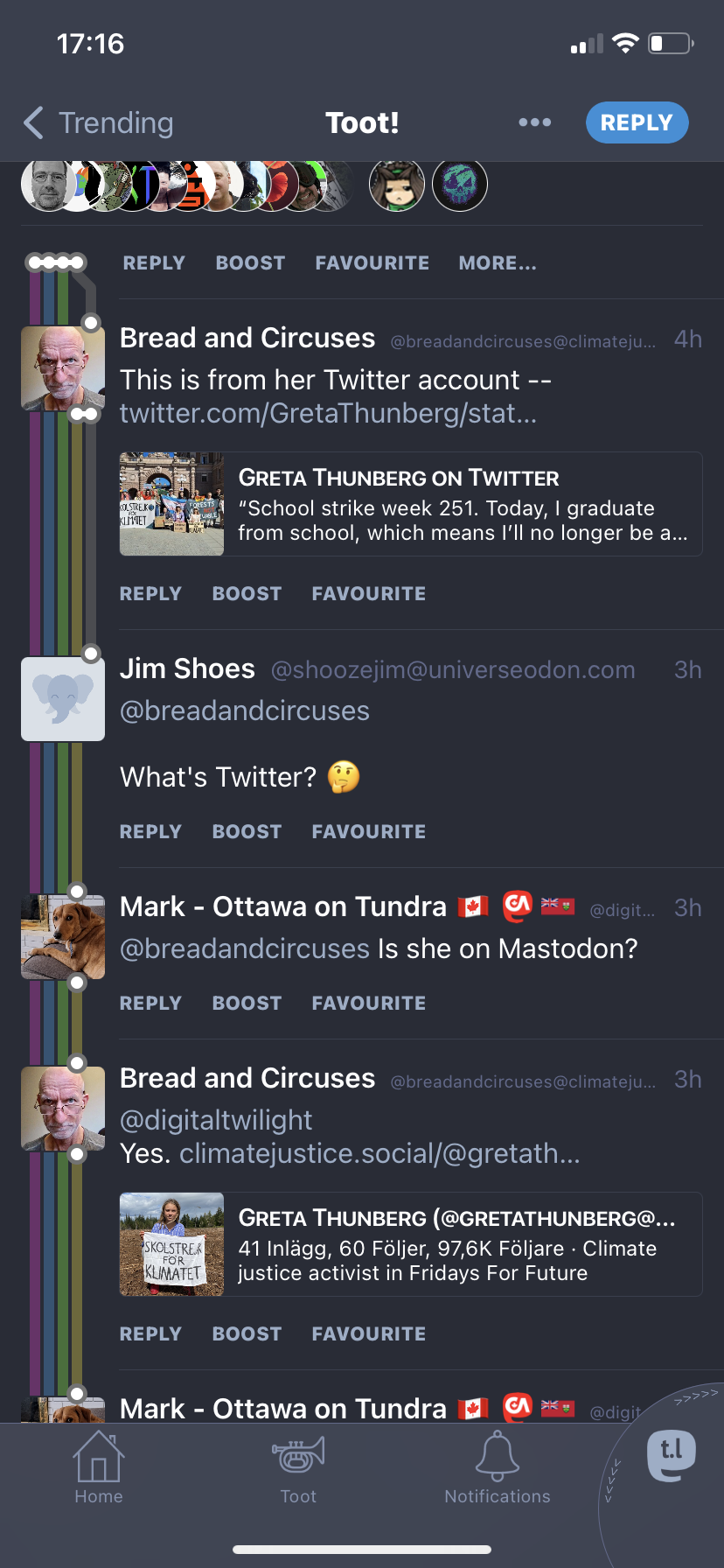
        Yup, there are threads but it depends on which app you're using whether these are displayed clearly.

        For example the iPhone app Toot! shows the threads using a railway map style:

        https://fedi.tips/wp-content/uploads/2023/06/IMG_3902.png

        johan@tilde.zoneJ This user is from outside of this forum
        johan@tilde.zoneJ This user is from outside of this forum
        johan@tilde.zone
        wrote sidst redigeret af
        #17

        @FediTips @aspragg

        Here's the #userscript for #Tampermonkey:

        https://github.com/afontenot/userjs/blob/main/mastodon/mastodon-threaded-replies.user.js

        1 Reply Last reply
        0
        • supermoosie@mastodon.auS supermoosie@mastodon.au

          @CuriousMagpie @FediTips

          Yes*

          You can go into settings and enable the hastag tab.
          Put the hashags you want to appear in there. You will just have a feed of those tags.

          *It doesn't remove tags you are already following. They will still appear in your home tab.
          So you will have to unfollow, and add them in the hastag tab manually.

          I have tags I follow like art or mossadon, so they come up in my timetable.

          For other topics I want to only see when I am in the mood, I put them in the hastag tab.

          feditips@social.growyourown.servicesF This user is from outside of this forum
          feditips@social.growyourown.servicesF This user is from outside of this forum
          feditips@social.growyourown.services
          wrote sidst redigeret af
          #18

          @SuperMoosie @CuriousMagpie

          There isn't a hashtag tab as far as I know?

          Are you talking about adding hashtags to a column in the advanced web interface?

          supermoosie@mastodon.auS 1 Reply Last reply
          0
          • shadowfals@toot.catS shadowfals@toot.cat

            @peaoPerdido that's true.

            Trending areas show top public posts or hashtags from the host site's connections.

            Toot.cat and datasci.social, for example, have different connections. So they don't collect the same public posts.

            @FediTips

            feditips@social.growyourown.servicesF This user is from outside of this forum
            feditips@social.growyourown.servicesF This user is from outside of this forum
            feditips@social.growyourown.services
            wrote sidst redigeret af
            #19

            @shadowfals @peaoPerdido

            Yes, different servers have different views of the Fediverse. There is no single centralised list of trends.

            1 Reply Last reply
            0
            • feditips@social.growyourown.servicesF feditips@social.growyourown.services

              @SuperMoosie @CuriousMagpie

              There isn't a hashtag tab as far as I know?

              Are you talking about adding hashtags to a column in the advanced web interface?

              supermoosie@mastodon.auS This user is from outside of this forum
              supermoosie@mastodon.auS This user is from outside of this forum
              supermoosie@mastodon.au
              wrote sidst redigeret af
              #20

              @FediTips @CuriousMagpie

              Hmm, checked webapp, and a few others. Looks like you are correct. Had thought I had seen it there, but am wrong.

              Using Tusky app has a hashtag tab.

              In Megalodon, you can edit timelines and add hastags.

              But they seem to be in saved in the app, not in account.

              feditips@social.growyourown.servicesF 1 Reply Last reply
              0
              • supermoosie@mastodon.auS supermoosie@mastodon.au

                @FediTips @CuriousMagpie

                Hmm, checked webapp, and a few others. Looks like you are correct. Had thought I had seen it there, but am wrong.

                Using Tusky app has a hashtag tab.

                In Megalodon, you can edit timelines and add hastags.

                But they seem to be in saved in the app, not in account.

                feditips@social.growyourown.servicesF This user is from outside of this forum
                feditips@social.growyourown.servicesF This user is from outside of this forum
                feditips@social.growyourown.services
                wrote sidst redigeret af
                #21

                @SuperMoosie @CuriousMagpie

                Ahh, interesting! It's good to hear about this being a feature in Tusky though, thanks for bringing it up 👍

                supermoosie@mastodon.auS 1 Reply Last reply
                0
                • feditips@social.growyourown.servicesF feditips@social.growyourown.services

                  @SuperMoosie @CuriousMagpie

                  Ahh, interesting! It's good to hear about this being a feature in Tusky though, thanks for bringing it up 👍

                  supermoosie@mastodon.auS This user is from outside of this forum
                  supermoosie@mastodon.auS This user is from outside of this forum
                  supermoosie@mastodon.au
                  wrote sidst redigeret af
                  #22

                  @FediTips

                  It is very useful.

                  xuan@todon.euX 1 Reply Last reply
                  0
                  • feditips@social.growyourown.servicesF feditips@social.growyourown.services

                    @johan @CuriousMagpie

                    Johan's right, you unfortunately can't add tags to a list. This is one of the most requested features so the developers know there is demand for it.

                    If you're comfortable using Github you can give it a thumbs up at https://github.com/mastodon/mastodon/issues/7692

                    red_shirt_no2@c.imR This user is from outside of this forum
                    red_shirt_no2@c.imR This user is from outside of this forum
                    red_shirt_no2@c.im
                    wrote sidst redigeret af
                    #23

                    @CuriousMagpie @FediTips @johan
                    I’m aware that you can add URLs to an RSS reader to get feeds for particular Mastodon accounts (I’ve not used this yet). Can one also do that for hashtags?

                    feditips@social.growyourown.servicesF 1 Reply Last reply
                    0
                    • red_shirt_no2@c.imR red_shirt_no2@c.im

                      @CuriousMagpie @FediTips @johan
                      I’m aware that you can add URLs to an RSS reader to get feeds for particular Mastodon accounts (I’ve not used this yet). Can one also do that for hashtags?

                      feditips@social.growyourown.servicesF This user is from outside of this forum
                      feditips@social.growyourown.servicesF This user is from outside of this forum
                      feditips@social.growyourown.services
                      wrote sidst redigeret af
                      #24

                      @Red_Shirt_no2 @CuriousMagpie @johan

                      Yes, you can add .rss to the end of the web URL for a hashtag search to get its RSS feed.

                      That shows you the feed for that tag viewed via the server where you did the search.

                      johan@tilde.zoneJ 1 Reply Last reply
                      0
                      • feditips@social.growyourown.servicesF feditips@social.growyourown.services

                        @Red_Shirt_no2 @CuriousMagpie @johan

                        Yes, you can add .rss to the end of the web URL for a hashtag search to get its RSS feed.

                        That shows you the feed for that tag viewed via the server where you did the search.

                        johan@tilde.zoneJ This user is from outside of this forum
                        johan@tilde.zoneJ This user is from outside of this forum
                        johan@tilde.zone
                        wrote sidst redigeret af
                        #25

                        @FediTips @Red_Shirt_no2 @CuriousMagpie

                        🙁

                        feditips@social.growyourown.servicesF 1 Reply Last reply
                        0
                        • feditips@social.growyourown.servicesF feditips@social.growyourown.services

                          Had several questions about how the main "Home" feed works on Mastodon. Here's what it shows:

                          1. All posts from all accounts you follow in chronological order, newest at top
                          2. All posts shared by accounts or groups you follow
                          3. Posts that use hashtags you follow in chronological order, newest at top

                          ...and that's it, there's nothing else on your Home feed. It doesn't push anything else at you, it doesn't hide anything from you unless you ask it to. No algorithms, no ads.

                          #FediTips #Mastodon

                          chrisjdfast@mastodon.socialC This user is from outside of this forum
                          chrisjdfast@mastodon.socialC This user is from outside of this forum
                          chrisjdfast@mastodon.social
                          wrote sidst redigeret af
                          #26

                          @FediTips Is there any way to limit posts from certain users? I like Cory Doctorow but he (re)posts wayyyyy too much and it spams up my timeline so I unfollowed him. Can I just see every fifth time he posts or something? Or only the most popular post by him that day??

                          feditips@social.growyourown.servicesF 1 Reply Last reply
                          0
                          • chrisjdfast@mastodon.socialC chrisjdfast@mastodon.social

                            @FediTips Is there any way to limit posts from certain users? I like Cory Doctorow but he (re)posts wayyyyy too much and it spams up my timeline so I unfollowed him. Can I just see every fifth time he posts or something? Or only the most popular post by him that day??

                            feditips@social.growyourown.servicesF This user is from outside of this forum
                            feditips@social.growyourown.servicesF This user is from outside of this forum
                            feditips@social.growyourown.services
                            wrote sidst redigeret af feditips@social.growyourown.services
                            #27

                            @chrisjdfast

                            For the posts he's sharing (boosting / reposting) you can switch off his boosts. Go to his profile page, click "mute boosts".

                            For his normal posts, there's unfortunately no direct way to limit a specific account except to mute it or block it completely. A workaround in his case might be to use Mastodon's filters system to hide posts that contain the phrase "long thread/" (including /) as he uses this for his megathreads. More info on using filters at https://fedi.tips/filtering-your-timeline-to-hide-posts-on-mastodon

                            laukidh@infosec.exchangeL chrisjdfast@mastodon.socialC 2 Replies Last reply
                            0
                            • johan@tilde.zoneJ johan@tilde.zone

                              @FediTips @Red_Shirt_no2 @CuriousMagpie

                              🙁

                              feditips@social.growyourown.servicesF This user is from outside of this forum
                              feditips@social.growyourown.servicesF This user is from outside of this forum
                              feditips@social.growyourown.services
                              wrote sidst redigeret af
                              #28

                              @johan

                              Can you try this for example:

                              https://mas.to/tags/dogs.rss

                              johan@tilde.zoneJ 1 Reply Last reply
                              0
                              • feditips@social.growyourown.servicesF feditips@social.growyourown.services

                                @johan

                                Can you try this for example:

                                https://mas.to/tags/dogs.rss

                                johan@tilde.zoneJ This user is from outside of this forum
                                johan@tilde.zoneJ This user is from outside of this forum
                                johan@tilde.zone
                                wrote sidst redigeret af
                                #29

                                @FediTips

                                Mea culpa, made a typo 😊

                                1 Reply Last reply
                                0
                                • feditips@social.growyourown.servicesF feditips@social.growyourown.services

                                  @chrisjdfast

                                  For the posts he's sharing (boosting / reposting) you can switch off his boosts. Go to his profile page, click "mute boosts".

                                  For his normal posts, there's unfortunately no direct way to limit a specific account except to mute it or block it completely. A workaround in his case might be to use Mastodon's filters system to hide posts that contain the phrase "long thread/" (including /) as he uses this for his megathreads. More info on using filters at https://fedi.tips/filtering-your-timeline-to-hide-posts-on-mastodon

                                  laukidh@infosec.exchangeL This user is from outside of this forum
                                  laukidh@infosec.exchangeL This user is from outside of this forum
                                  laukidh@infosec.exchange
                                  wrote sidst redigeret af
                                  #30

                                  @FediTips @chrisjdfast I’ve seen him specifically recommend muting “Long thread/“

                                  feditips@social.growyourown.servicesF 1 Reply Last reply
                                  0
                                  • laukidh@infosec.exchangeL laukidh@infosec.exchange

                                    @FediTips @chrisjdfast I’ve seen him specifically recommend muting “Long thread/“

                                    feditips@social.growyourown.servicesF This user is from outside of this forum
                                    feditips@social.growyourown.servicesF This user is from outside of this forum
                                    feditips@social.growyourown.services
                                    wrote sidst redigeret af
                                    #31

                                    @Laukidh @chrisjdfast

                                    Thanks, I've added it to the advice 🙏

                                    laukidh@infosec.exchangeL 1 Reply Last reply
                                    0
                                    • feditips@social.growyourown.servicesF feditips@social.growyourown.services

                                      @Laukidh @chrisjdfast

                                      Thanks, I've added it to the advice 🙏

                                      laukidh@infosec.exchangeL This user is from outside of this forum
                                      laukidh@infosec.exchangeL This user is from outside of this forum
                                      laukidh@infosec.exchange
                                      wrote sidst redigeret af
                                      #32

                                      @FediTips @chrisjdfast source: https://pluralistic.net/2023/04/16/how-to-make-the-least-worst-mastodon-threads/

                                      1 Reply Last reply
                                      0
                                      • feditips@social.growyourown.servicesF feditips@social.growyourown.services

                                        @chrisjdfast

                                        For the posts he's sharing (boosting / reposting) you can switch off his boosts. Go to his profile page, click "mute boosts".

                                        For his normal posts, there's unfortunately no direct way to limit a specific account except to mute it or block it completely. A workaround in his case might be to use Mastodon's filters system to hide posts that contain the phrase "long thread/" (including /) as he uses this for his megathreads. More info on using filters at https://fedi.tips/filtering-your-timeline-to-hide-posts-on-mastodon

                                        chrisjdfast@mastodon.socialC This user is from outside of this forum
                                        chrisjdfast@mastodon.socialC This user is from outside of this forum
                                        chrisjdfast@mastodon.social
                                        wrote sidst redigeret af
                                        #33

                                        @FediTips Thank you so much! I didn't know about the filter system. Super helpful!

                                        1 Reply Last reply
                                        0
                                        • feditips@social.growyourown.servicesF feditips@social.growyourown.services

                                          Had several questions about how the main "Home" feed works on Mastodon. Here's what it shows:

                                          1. All posts from all accounts you follow in chronological order, newest at top
                                          2. All posts shared by accounts or groups you follow
                                          3. Posts that use hashtags you follow in chronological order, newest at top

                                          ...and that's it, there's nothing else on your Home feed. It doesn't push anything else at you, it doesn't hide anything from you unless you ask it to. No algorithms, no ads.

                                          #FediTips #Mastodon

                                          tirf@mastodon.mlT This user is from outside of this forum
                                          tirf@mastodon.mlT This user is from outside of this forum
                                          tirf@mastodon.ml
                                          wrote sidst redigeret af
                                          #34

                                          «All posts shared by accounts or groups you follow». Including shared replies?
                                          @FediTips

                                          feditips@social.growyourown.servicesF 1 Reply Last reply
                                          0
                                          Svar
                                          • Svar som emne
                                          Login for at svare
                                          • Ældste til nyeste
                                          • Nyeste til ældste
                                          • Most Votes


                                          • Log ind

                                          • Har du ikke en konto? Tilmeld

                                          • Login or register to search.
                                          Powered by NodeBB Contributors
                                          Graciously hosted by data.coop
                                          • First post
                                            Last post
                                          0
                                          • Hjem
                                          • Seneste
                                          • Etiketter
                                          • Populære
                                          • Verden
                                          • Bruger
                                          • Grupper